
Contents
The Short Answer
The best WordPress MCP plugin depends on the job you want your AI assistant to do. Writing a draft, changing an Elementor widget, updating a WooCommerce variation and analyzing Search Console data need different tools and different permissions.
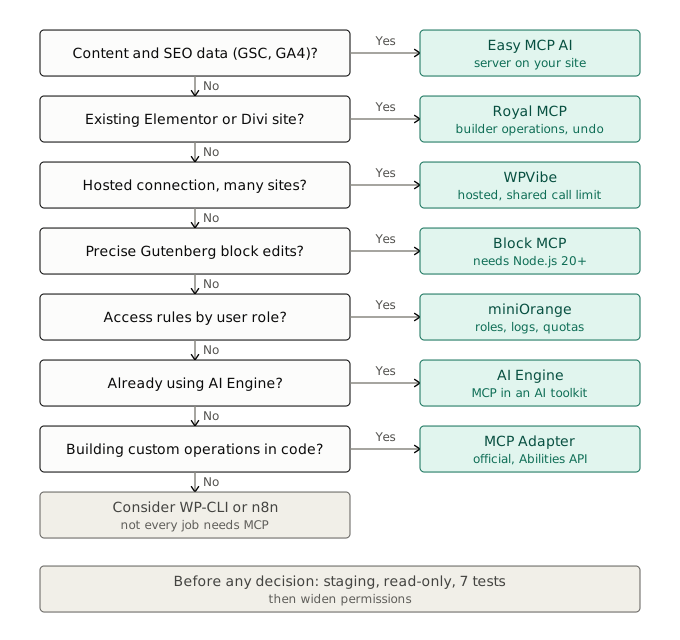
Start here:
- Content and SEO workflow: Easy MCP AI. The server runs on your own site and documents SEO-field editing plus Search Console, GA4 and DataForSEO integrations.
- Existing Elementor or Divi site: Royal MCP. It documents builder-aware operations, logging and undo tokens.
- Hosted connection across several sites: WPVibe. The vendor runs the connection layer, which is convenient but adds a dependency.
- Developers building custom operations: the official MCP Adapter, together with WordPress abilities.
How this guide was built. Every plugin was checked against its official WordPress.org listing, vendor documentation, pricing page or repository on October 3, 2026. Each claim carries one of two labels:
- Documented: the vendor says the feature exists. This is what most of this guide can support.
- Tested: a task was executed on a real WordPress stack. Results appear in the hands-on log in the testing section, and every empty row there is marked as not yet run.
No scores or rankings are invented. Where a claim could not be confirmed, the guide says so instead of guessing.
Quick Pick: Which Plugin for Which Task?
Start with the recurring task you want to automate, then check that the plugin exposes the exact operation your site needs.
| Your main task | Start with | The deciding question |
|---|---|---|
| Draft articles, edit SEO fields, query SEO data | Easy MCP AI | Can it reach your SEO plugin and the right analytics accounts? |
| Update an existing Elementor or Divi page | Royal MCP | Is the operation you need included in Free or only in Pro? |
| Use a hosted service and manage several sites | WPVibe | Does the relay model and shared call allowance fit your workload? |
| Edit individual Gutenberg blocks | Block MCP | Can you run its Node.js server next to WordPress? |
| Add MCP to an AI toolkit you already use | AI Engine | Are the tools you need in your edition? |
| Apply rules to AI users and roles | miniOrange Secure MCP Server | Which controls and request quota does your plan include? |
| Expose your own functionality to AI clients | MCP Adapter | Which abilities will supply the real business operations? |
This is a shortlist matched to tasks, not a measured ranking. Two things to keep apart before you choose:
- Content operations: create a draft, revise a paragraph, insert an internal link.
- SEO metadata and data: edit the fields controlled by Yoast or Rank Math, and separately read queries, clicks and positions from a data provider.
A plugin that updates meta descriptions may have no access to Search Console, and a tool that reads reports may be unable to change content. A broad “WordPress supported” label cannot answer the useful question: “Can the tool change this field while preserving the surrounding structure?”
[EDITOR: add a short “which one I use on my own sites and why” line here once you have chosen. It is the strongest trust signal on the page.]
What Is a WordPress MCP Plugin?
MCP (Model Context Protocol) is an open protocol that lets an AI client such as Claude or ChatGPT discover and call tools exposed by a server. On WordPress, those tools are operations like “list posts”, “update an SEO title” or “read a product”. A WordPress MCP plugin is what puts such a server, or a connection to one, on your site.
Three terms overlap, but they describe different parts of the system:
- Plugin: the installation format.
- MCP server: the component that exposes operations to the AI client.
- Adapter: a layer that translates capabilities registered elsewhere, such as WordPress abilities, into MCP tools, resources and prompts.
Four Architectures
| Architecture | Typical request path | Examples (documented) | Practical trade-off |
|---|---|---|---|
| Server inside WordPress | AI client → your site’s endpoint | Easy MCP AI, Royal MCP, miniOrange | Your hosting must allow the endpoint and authentication |
| Hosted relay | AI client → vendor service → WordPress | WPVibe | Less to operate, but an extra service in the request path |
| Local server plus plugin | AI client → local server → WordPress | Block MCP | More local setup and process management |
| Adapter plus abilities | AI client → adapter → registered operation | MCP Adapter | Precise control over operations, but you need abilities to expose |
[EDITOR: add one simple architecture diagram here (AI client → MCP server → WordPress → SEO plugin / builder), plain boxes and arrows, in your own style.]
The official adapter exposes opted-in abilities through discovery and execution tools. Permission checks remain part of each operation, so a registered ability is not automatically an unrestricted public action. Source: MCP Adapter repository.
Self-hosting does not mean the data stays inside WordPress. Tool results travel back to the connected AI client, so the client, its data handling and any connected providers are part of your privacy picture.
What You Need Before Installing Anything
- A staging site. First tests belong there, not on production.
- HTTPS and a reachable REST API. Security plugins, CDNs and firewalls are the most common blockers (see the troubleshooting section).
- An AI client that supports remote MCP connectors, or a local bridge for clients that only speak stdio.
- A dedicated WordPress user with the lowest role that can do the job, not your administrator account.
- A restore point you have confirmed can be restored.
Minimum versions from each official listing, checked October 3, 2026:
| Option | Requires WordPress | Requires PHP | Other |
|---|---|---|---|
| Easy MCP AI | 6.0+ | 7.4+ | None listed |
| Royal MCP | 5.8+ | 7.4+ | None listed |
| WPVibe | 6.0+ | 7.4+ | Hosted service account |
| miniOrange Secure MCP Server | 6.9+ | 7.4+ | None listed |
| MCP Adapter | 6.9+ | 7.4+ | Needs abilities from another plugin or your own code |
| Block MCP | 6.5+ on the target site | n/a | Node.js 20+ server |
WordPress.com MCP Is a Separate Option
WordPress.com provides its own MCP access. Its documentation lists availability on paid WordPress.com plans, during the first 30 days of a new free site, and for self-hosted sites connected through specified Jetpack plans. Check eligibility before installing another connector, because a platform-managed connection may already do what you need. Source: WordPress.com MCP availability.
Do Not Start With the Archived Automattic Repository
The older Automattic/wordpress-mcp repository was archived on January 19, 2026 and is read-only. Its notice encourages users to migrate to the official mcp-adapter, where new work now happens. Older tutorials that start from that repository are outdated. Source: archived project notice.
WordPress MCP Plugins Compared
All capabilities below are documented, not independently tested. Prices and availability were reviewed on October 3, 2026. AI and data-provider charges are separate.
Setup and Access
| Option | Installation and execution | Access model | Price or limitation |
|---|---|---|---|
| Easy MCP AI | Plugin; server runs on your site | OAuth 2.1 or tokens; WordPress capabilities | Free plugin; provider costs separate |
| Royal MCP | Plugin; direct site connection | OAuth 2.0 or API key | Free; Pro pricing differs across official pages |
| WPVibe | Plugin plus hosted relay | Client OAuth; WordPress Application Password | Free allowance; paid service tiers |
| AI Engine | Plugin and AI toolkit | Verify the current MCP configuration | Basic MCP server in Free; advanced tools in Pro |
| miniOrange Secure MCP Server | MCP server plugin | OAuth 2.1, API keys, role controls | Free tier; published usage claims conflict |
| MCP Adapter | Official WordPress plugin | User authentication and ability permissions | Free; value depends on abilities |
| Block MCP | Plugin plus Node.js server | WordPress Application Passwords | Open source; needs server setup |
What Each One Documents
| Option | Content | SEO | Builders | WooCommerce | Controls and recovery |
|---|---|---|---|---|---|
| Easy MCP AI | Post management | SEO plugin fields; Search Console, GA4, DataForSEO | Not documented | Documented | Read-only level, token expiry, tool permissions |
| Royal MCP | Check docs | SEO integrations | Elementor, Divi | Documented | Logging, previews, undo tokens |
| WPVibe | Content operations | Check docs | Several page builders | Documented | Approval steps for risky operations, draft previews |
| AI Engine | Content generation (toolkit) | Check docs | Check docs | Pro | Check docs |
| miniOrange | Check docs | Check docs | Check docs | Check docs | Roles, per-tool controls, activity logs |
| MCP Adapter | Depends on abilities | Depends on abilities | Depends on abilities | Depends on abilities | Permission check per ability |
| Block MCP | Gutenberg blocks | Not documented | Not documented | Not documented | Revisions, concurrency checks |
“Check docs” means the sources reviewed did not state it clearly, so confirm before relying on it.
Adoption Snapshot
WordPress.org listing data, October 3, 2026. Install counts are rounded ranges and say little about the quality of the MCP component, so treat them as a rough sign of maturity only.
| Plugin | Version on listing | Active installations |
|---|---|---|
| WPVibe | 1.20.1 | 50,000+ |
| Easy MCP AI | 2.0.1 | 10,000+ |
| Royal MCP | 1.5.6 | 10,000+ |
| miniOrange Secure MCP Server | 1.4.14 | 4,000+ |
| MCP Adapter | 0.7.0 | Fewer than 10 |
The MCP Adapter’s low number reflects a very recent directory listing. Its main route to adoption is through other plugins and developers, not direct installs. AI Engine and Block MCP are not in this table because the sources reviewed gave no comparable figure.
The Best WordPress MCP Plugins by Use Case
Each review follows the same pattern: who it fits, its main limitation, and when to skip it. Everything here is documented by the vendor unless a Tested note says otherwise.
[EDITOR: for any plugin you have actually run, add a one-line “Tested:” note under its review (WordPress version, plugin version, client, what worked, what failed). Delete this note once done.]
1. Easy MCP AI: A Strong Shortlist for Content and SEO
Easy MCP AI runs its server inside WordPress. Its documentation describes post management, WooCommerce operations, and integrations with SEO plugins and analytics providers. It also documents an audit log that records calls refused before they run. The direct connection keeps a hosted relay out of the request path.
Best fit: an editor or SEO specialist who wants research, content updates and performance analysis available from one AI client.
Main limitation: an integration does not guarantee that every field or report works on your installed versions. The listing also states that access cannot be restricted to individual posts, so review tool permissions and the capabilities of the WordPress user it acts as.
Cost: free plugin; connected AI and data services keep their own pricing. Source: Easy MCP AI listing.
Skip it if: you need an assistant restricted to a handpicked list of pages. Confirm a workable restriction method first.
2. Royal MCP: A Shortlist for Existing Elementor and Divi Sites
Royal MCP documents Elementor, Divi, WooCommerce and SEO integrations, OAuth and API-key connections, logging, previews and undo tokens.
Best fit: maintaining an existing site where builder-aware operations matter more than generating a whole page from scratch.
Main limitation: Free and Pro expose different operations. A tool that replaces text in an existing widget is not proof of unrestricted widget creation, and an operation-level undo is not a site backup.
Cost: Free plugin; Pro prices differ between official pages (see the cost section). Match your intended change to the current tool reference before paying. Source: Royal MCP listing.
Skip it if: the operation you need exists only in Pro and does not justify the license.
3. WPVibe: A Hosted Connection for Broader Site Work
WPVibe combines a WordPress plugin with a hosted MCP service. Its documentation covers content operations, several page builders, WooCommerce and draft workflows for classic themes.
Best fit: people who prefer the vendor to run the connection infrastructure and want one service across several sites.
Main limitation: the relay becomes an operational dependency. According to the plugin’s service disclosure, WordPress credentials are stored encrypted on WPVibe’s servers. Content changes and theme changes also follow different publishing processes. Source: WPVibe listing.
The vendor describes approval steps for risky operations and draft previews for theme work. Source: WPVibe documentation.
Skip it if: your project requires a direct client-to-site connection, or your workload regularly exceeds the shared call allowance.
4. AI Engine: A Fit for Sites Already Using a WordPress AI Toolkit
AI Engine combines MCP with chatbots, content generation and other AI features. The product page reviewed for version 3.8.3 lists a WordPress MCP server in Free, while advanced MCP tools for WooCommerce, database, theme and plugin management appear under Pro.
Best fit: an existing AI Engine user extending an established setup.
Main limitation: basic MCP in Free does not mean every advanced operation is free, and the plugin’s overall install base says little about adoption of its MCP component.
Cost: check the exact tools and edition before buying. Source: AI Engine Free and Pro comparison.
Skip it if: all you need is a narrow connector and the rest of the toolkit adds little value.
5. miniOrange Secure MCP Server: A Candidate for Access Governance
miniOrange documents self-hosted OAuth, API keys, role-based access, individual tool controls and activity logs. Its product site also describes policy enforcement and approval workflows.
Best fit: a team that must define which AI users can perform which operations.
Main limitation: official sources disagree about usage. The WordPress listing advertises unlimited calls, while the vendor pricing page specifies daily request allowances and paid tiers. Confirm your edition and commercial terms before building a recurring automation on either claim.
Sources: miniOrange listing and vendor features and pricing.
Skip it if: simple drafting is your only need and policy configuration would be unnecessary administration.
6. MCP Adapter: The Official Foundation for Custom Abilities
MCP Adapter translates WordPress abilities into MCP tools, resources and prompts. Version 0.7.0 is the current WordPress.org listing, and its changelog includes a WP-CLI command (wp mcp-adapter serve) for stdio use. Tutorials that assume a GitHub-only install may be out of date. Source: MCP Adapter listing.
Best fit: developers exposing application-specific operations through the WordPress Abilities API.
Main limitation: the adapter is the transport layer, not a toolkit. Install an abilities-providing plugin or register the operations yourself. The listing requires WordPress 6.9 or newer.
Skip it if: you want a ready-made editorial toolkit and have no abilities provider or developer help.
7. Block MCP: A Specialist for Gutenberg Editing
Block MCP documents structured Gutenberg edits, revisions and concurrency checks. Its WordPress plugin works with a Node.js server (Node.js 20 or newer) and WordPress Application Passwords.
Best fit: repeated edits to individual blocks where preserving the rest of the page is the priority.
Main limitation: block-theme templates and widget areas are outside the documented scope. Source: Block MCP repository.
Skip it if: you want a plugin-only install or your main work sits outside Gutenberg content.
MCP vs WP-CLI, the REST API and Automation Tools
MCP is not always the right tool. The same WordPress change can often be made four different ways:
| Approach | Best for | Weak at |
|---|---|---|
| MCP plugin | Judgement-based work you review: read a page, propose a change, approve it | Large repeatable batches; call allowances and retries add cost |
| WP-CLI | Deterministic bulk jobs on a server you control: search-replace, imports, scheduled maintenance | Needs shell access; no natural-language discovery |
| REST API | Custom integrations and apps; often the layer an MCP server sits on | Needs code, authentication and error handling |
| n8n, Zapier or Make | Fixed, trigger-based workflows with an AI step | Exploratory tasks where the steps change per page |
Rule of thumb: if you can write the steps down in advance and they never change, use a script or workflow tool. If every page needs reading, judgement and your approval, use MCP.
A hybrid that works well for SEO: a scheduled workflow pulls Search Console data weekly and flags pages whose CTR dropped. You then open your AI client, review those pages through MCP, and approve one edit at a time.
None of these options was benchmarked for this guide. The comparison reflects how each is documented to work.
Which AI Clients Work With Which Plugin?
Three connection styles are in use, and the client you prefer decides which one you can use:
- Remote connector: you paste the site’s endpoint URL into the client and authorize with OAuth. This is the simplest route for clients with custom connector support.
- API token or key: the client sends a token in an Authorization header. Useful for clients without OAuth support.
- Local server or bridge: a process on your computer talks to WordPress. Clients limited to local stdio may need a bridge such as mcp-remote, and Block MCP’s Node.js server works this way.
| Option | Clients named in official sources | Connection style |
|---|---|---|
| Easy MCP AI | Claude.ai (dedicated guide); ChatGPT (listing tag) | One-click or endpoint URL; OAuth 2.1 or tokens |
| Royal MCP | Claude Desktop connector; OpenAI, Gemini, Groq, Azure and Bedrock listed in its changelog | OAuth 2.0 or API key |
| WPVibe | See the vendor’s connection page | Hosted endpoint; client OAuth |
| miniOrange | Claude and ChatGPT (listing tags) | Self-hosted OAuth 2.1 with Dynamic Client Registration |
| MCP Adapter | Depends on transport | Remote endpoint or WP-CLI stdio |
| Block MCP | Clients that can launch a local MCP server | Local Node.js server plus Application Passwords |
Client features and plan requirements for custom connectors change often, so check your client’s current documentation before you start. A successful connection only proves the client can discover the tools. It does not prove a given task works.
[EDITOR: add a line listing the clients you personally connected (for example Claude, ChatGPT, Cursor) and any workaround you needed.]
Security Checklist Before You Connect AI to WordPress
An MCP connection lets an AI act on your site with a real WordPress user’s permissions. Treat it like giving a new contractor an account.
| Control | Why it matters | How to verify |
|---|---|---|
| Use a dedicated user with the lowest workable role | The AI inherits that user’s capabilities | Compare the role with the tasks you actually need |
| Start read-only | Reading is safe to test; writing is not | Ask for a write and confirm it is refused |
| Enable write tools one at a time | Smaller blast radius if something goes wrong | Review the plugin’s tool list after each change |
| Leave high-risk tools off by default | Database, file, theme and plugin management tools can break a site | Check the tool list for these categories (AI Engine Pro documents some) |
| Prefer OAuth over long-lived tokens | OAuth grants can be revoked centrally | If you must use tokens, set an expiry and send them in the Authorization header, never in a URL |
| Require approval for writes | A human catches wrong targets before they save | Confirm the client shows a prompt before each write |
| Turn on logging | You need a record of what the AI did | Make one change and find it in the log |
| Confirm you can restore | Logs record actions; they do not undo them | Restore one sample item from a backup, revision or undo token |
| Know how to disconnect | You must be able to cut access fast | Revoke a test token or grant and confirm calls fail |
| Keep plugins updated | These plugins release frequently, including security fixes | Read the changelog before updating on production |
Two Risks That Are Easy to Miss
Prompt injection. An AI that reads comments, imported text, scraped pages or product descriptions may encounter instructions hidden in that content. If the same session can also write to your site, treat every write as untrusted until you approve it, and avoid combining untrusted content with broad permissions.
Where the data goes. Tool results return to the AI client and its provider. Self-hosting the MCP server does not change that. Do not expose customer or order details unless the task needs them. With a hosted relay such as WPVibe, the vendor also holds the connection credentials (encrypted, per its service disclosure), so judge the vendor as part of your risk assessment.
This checklist is general guidance, not an audit of any plugin. No penetration test or security benchmark was run for this guide.
SEO Workflows With Copy-Ready Prompts
The strongest use of MCP is a controlled loop: retrieve evidence, propose a change, apply one approved edit, verify the result. The prompts below follow that loop. Each is a template. Replace the bracketed parts and keep the “do not save” lines until you have reviewed the output.
A workflow that spans SEO research, metadata edits and analytics is a reasonable shortlist criterion, but it is not evidence of better rankings. Source: Easy MCP AI workflow overview.
1. Find Pages With Impressions but Few Clicks (read-only)
Compare this page’s Search Console queries for the latest complete 28-day period with the previous 28 days. Keep country and device filters consistent. Identify changes in impressions, clicks, CTR and average position. Read the current SEO title and meta description. Suggest revisions aligned with the leading queries, but do not save changes.
A lower CTR does not automatically justify a new title. A shift in query mix or position can produce the same pattern, so ask the assistant to separate those causes before it recommends edits.
2. Apply One Approved Metadata Change (narrow write)
Update only the SEO title and meta description for post ID [123]. Preserve the slug, canonical URL, robots settings, body content and publication status. Read back the saved values and report any differences from the requested text.
Post ID 123 is an example. Replace it with the confirmed page identifier.
3. Audit Missing or Duplicate SEO Titles (read-only)
List published posts and pages whose SEO title or meta description is empty or duplicated. Return a table with ID, URL, current value and the issue. Do not change anything.
4. Suggest Internal Links (read-only)
For the post [URL], find up to five published posts that are genuinely relevant. For each, propose the exact sentence in the current post where a link fits and the anchor text. Do not use generic anchors. Do not save changes.
5. Refresh an Aging Post as a Draft (write, draft only)
Read post ID [123] and its top Search Console queries from the last 90 days. List queries the post does not address. Propose new subheadings and short sections for them. Create the changes as a draft revision and leave the live post unchanged.
Check that your plugin can actually create a draft or revision. If it cannot, keep this prompt read-only.
Search Console Data Is Not Rank Tracking
A Search Console report describes recorded search performance. A SERP request checks the results for a keyword, location and device at one moment. A recurring rank tracker also needs scheduling, consistent settings and stored history.
Do not assume a DataForSEO integration includes the whole tracking system. Confirm the available endpoint, then decide where scheduled results and history will live. The MCP connection is one component of that setup.
[EDITOR: add one real before/after from your own site (a prompt you ran, what changed, what you reversed). Real results are what separate this page from a rewrite of documentation.]
What to Test Before You Rely on a Plugin
Evidence comes in three strengths. Documentation shows a vendor offers a tool. A successful connection shows a client can discover it. Only an executed task shows it works correctly on your WordPress stack.
Run the checks below on staging and record the WordPress version, plugin version, active integrations and AI client. Measure completed tasks and the manual corrections each one needed, because an HTTP success is meaningless if a field was ignored or the wrong object changed.
| Test | Successful result | Evidence to keep |
|---|---|---|
| Create a draft | Correct content saved without publishing | Tool response and draft status |
| Update SEO fields | Saved values and rendered tags match the request | Before/after fields and page source |
| Edit one Gutenberg heading | Only the intended block changes | Editor view, content diff and frontend |
| Update one product variation | The intended variation changes; siblings do not | Product and variation IDs with before/after values |
| Query analytics | Correct property, dates, dimensions and filters | Returned report and source settings |
| Attempt a forbidden operation | The server refuses | Denied call and unchanged site state |
| Reverse a change | Fields return to their prior state | Restored values and remaining differences |
Hands-On Log
This table is where tested results belong. Until a row is filled in, treat that plugin’s behavior as documented only.
| Plugin | WordPress / plugin version | AI client | Tests passed (of 7) | Notes and failures |
|---|---|---|---|---|
| Easy MCP AI | [EDITOR] | [EDITOR] | Not run yet | [EDITOR] |
| Royal MCP | [EDITOR] | [EDITOR] | Not run yet | [EDITOR] |
| WPVibe | [EDITOR] | [EDITOR] | Not run yet | [EDITOR] |
| MCP Adapter | [EDITOR] | [EDITOR] | Not run yet | [EDITOR] |
[EDITOR: fill in only what you actually ran, and delete rows you did not test. If nothing has been run yet, remove this table and keep the sentence above it.]
Change History Is Not Recovery
An audit log records an action. A revision stores supported earlier content. A snapshot captures selected state. An undo tool reverses specified operations. Only a full backup gives a broad restoration path. Before approving a batch, identify which changed objects can be restored and rehearse one restore on a small sample. A log entry cannot bring back a deleted file.
What Does a WordPress MCP Setup Really Cost?
The plugin license is only one line of the bill:
Total cost = plugin or service fees + AI usage + data-provider usage + setup and maintenance time.
Published prices and allowances, reviewed October 3, 2026:
| Option | Published commercial information | Budget implication |
|---|---|---|
| Easy MCP AI | Free plugin | Budget separately for connected AI and data services |
| Royal MCP | Free plugin. The Pro page lists $99/year for one site, $249/year for five and $999/year for 100; another official support page advertises a $79 founding offer | Confirm the price at checkout |
| WPVibe | Free: 100 calls/day. Annual tiers: $99, $299, $599 and $899 | Allowances are shared across all sites on the account |
| AI Engine | Free MCP server; advanced MCP tools listed in Pro | Buy for the operations you need, not for basic protocol access |
| miniOrange | Pricing page: Free at 100 requests/day; early-bird annual tiers of $79, $149 and $299 | Verify edition and quota; the directory listing says unlimited |
| MCP Adapter | Free official plugin | Developing abilities may be your main cost |
| Block MCP | Open-source project | Local server setup and maintenance cost time |
Pricing sources: Royal MCP Pro, Royal MCP support, WPVibe pricing and miniOrange pricing. The miniOrange early-bird page states an October 31 deadline, so confirm the price when you buy.
Budget Calls Per Completed Task
When a plan limits calls per day, the number that matters is calls per finished task, not the headline allowance.
A hypothetical metadata refresh uses four counted calls per page: read the content, read the existing fields, save the approved change, and verify it. For 100 pages that is 400 calls. On a plan allowing 100 calls per day, the job takes four days. On a plan with a larger allowance it finishes in one session.
Real counts can be higher or lower because batching, retries and tool design change them. Measure a representative sample of five pages before choosing a tier. A small allowance can be plenty for occasional edits and frustrating for a catalog-wide update.
[EDITOR: replace the hypothetical with your measured calls per page once you have run the sample.]
How to Connect Your First WordPress MCP Plugin
The walkthrough below follows Easy MCP AI’s documented Claude.ai connection. It was checked against the setup documentation but not executed for this guide. Other products use different paths and authorization flows.
- Prepare staging. Work on a staging copy, confirm you have a restorable backup, and create a dedicated WordPress user with the lowest role that fits your task.
- Install the plugin. In WordPress, open Plugins → Add New Plugin, search for Easy MCP AI, install and activate it. Confirm the site uses HTTPS and suitable permalinks.
- Choose the client connection. Open the plugin dashboard and choose the Claude connection. Use a Claude account that supports custom connectors.
- Add the site endpoint. Use the one-click connection, or copy the endpoint into the client’s connector settings.
- Authorize access. Sign in on the WordPress authorization page and choose read-only access first.
- Verify a read. Ask the assistant to list the five latest posts and their publication statuses, then confirm the list in WordPress.
- Enable only the writes you need. Grant one operation, create one draft, and inspect it in the editor before going further.
[EDITOR: add three screenshots from your own staging site: the plugin dashboard, the authorization screen, and the result of the first read prompt.]
References: Easy MCP AI getting started and the Claude.ai connection guide.
The documented endpoint format is:
https://your-site.example/wp-json/easy-mcp-ai/v1/mcp
Copy the real endpoint from your dashboard.
For clients configured with API tokens, Easy MCP AI documents user binding, expiry and tool permissions. Send tokens in the Authorization header rather than in a URL, because URLs can appear in logs and browser history. Source: API token documentation.
Troubleshooting Connection and Compatibility Problems
Diagnose the failing layer before switching plugins. The path is: AI client → network, CDN and firewall → WordPress REST API → authentication → plugin tool permissions → the target plugin or builder. A healthy WordPress site can still be unreachable from an external AI client.
| Symptom | First check | Next step |
|---|---|---|
| Endpoint returns 404 | The exact dashboard URL and permalink routing | Run the plugin’s diagnostics and re-save permalinks |
| Connection returns 401 | Token or OAuth grant; whether the host strips the Authorization header | Reauthorize, or fix header forwarding on the host |
| Response is a bot challenge page | CDN, firewall or host protection | Allow the endpoint and the OAuth discovery routes |
| Connected client shows no expected tools | Enabled tools, permissions and integration activation | Refresh tool discovery and inspect the server’s actual tool list |
| Tools appear but a write is refused | Read-only grant or missing tool permission | Check the access level and the WordPress user’s role |
| Works in one client but not another | The client’s transport and OAuth support | Try a token connection or a local bridge such as mcp-remote |
| Calls stop partway through a job | A daily call allowance or rate limit | Check your plan’s quota and split the job |
| SEO update reports success but output differs | Saved value, SEO plugin template and page cache | Read the fields again and inspect the rendered HTML |
| Builder layout changes unexpectedly | Whether a dedicated builder operation was used | Reproduce on staging with a narrower instruction |
Easy MCP AI’s troubleshooting guide separates internal diagnostics from an external reachability check, and names stripped headers, REST restrictions, bot challenges and blocked OAuth discovery routes as likely failure points. Source: connection troubleshooting.
Frequently Asked Questions
What is the best WordPress MCP plugin?
There is no single best one. Easy MCP AI is a strong first test for combined content and SEO work, Royal MCP for existing Elementor or Divi sites, WPVibe if you want a hosted connection, and MCP Adapter if you are a developer exposing custom operations. Match the plugin to the exact task you want to automate.
Is MCP Adapter enough on its own?
No, not for editorial work. MCP Adapter provides the protocol and transport layer, and useful tasks depend on the abilities registered on the site. Confirm the exact operations before assuming it replaces a complete content connector.
Can a free WordPress MCP plugin still cost money to use?
Yes. The plugin, your AI service and any external data providers are priced separately. A free connector does not remove the fees or access requirements of the accounts it connects to.
Can I use a WordPress MCP plugin without Node.js?
Many WordPress-hosted implementations need no Node.js on your hosting, and Easy MCP AI documents a PHP-only server. Client compatibility still matters, because a client limited to local stdio may need a bridge. Block MCP explicitly requires Node.js for its server component.
Can AI edit Yoast or Rank Math fields?
Connectors with documented integrations can expose supported SEO fields. Verify the exact field, plugin version, user permission and rendered result. A generic post-meta writer is not automatically complete SEO-plugin support.
Can MCP access be read-only?
That depends on the server’s controls. Easy MCP AI documents a read-only access level for tokens and OAuth connections. Test the restriction by attempting a write before you rely on it.
Is it safe to connect AI to my WordPress site?
It can be, if you limit what the connection can do. Use a dedicated low-privilege user, start read-only, test on staging, keep logging on and confirm you can restore changes. See the security checklist above.
Should I use MCP, WP-CLI or an automation tool?
Use MCP for judgement-based work you review page by page. Use WP-CLI or a script for deterministic bulk jobs, and a workflow tool for fixed, trigger-based steps. Many teams combine them.
Does installing MCP improve Google rankings?
No. MCP is a way to access data and execute operations. Any ranking effect comes from the quality and correctness of the changes you make with it.
Which option should I try first?
For combined content and SEO, test Easy MCP AI on one real editorial task. For builder work, match your exact operation to Royal MCP’s or WPVibe’s documented tools. For custom development, evaluate MCP Adapter with the abilities your application needs. Keep the first test small: one draft, one field or one block.
Final Recommendation: Three Steps
- Pick by task, shortlist two. Use the quick-pick table to choose the plugin that matches your main recurring job, plus one alternative.
- Test on staging, read-only first. Run the seven acceptance tests, including the forbidden-operation test and one rehearsed restore. Record the results in the hands-on log.
- Budget calls, then widen permissions. Measure calls per page on a small sample, choose a plan from that number, and enable one extra tool at a time.
The cheapest mistake in this space is a wrong guess on one draft in staging. The expensive one is a broad permission on a live site you cannot restore.
Sources, Related Guides and Change Log
About the Author
[EDITOR: add your name and a two-sentence bio stating your real experience with SEO, Google Ads and WordPress automation. Do not claim testing you have not done.]
Sources Used
All checked October 3, 2026.
- WordPress.org listings: Easy MCP AI, Royal MCP, WPVibe, miniOrange Secure MCP Server, MCP Adapter
- Repositories: WordPress/mcp-adapter, Automattic/wordpress-mcp (archived), GravityKit/block-mcp
- Vendor pages: Easy MCP AI and its docs (getting started, Claude.ai connection, API tokens, troubleshooting); WPVibe and its pricing; Royal MCP Pro and support; AI Engine; miniOrange features and pricing
- Platform: WordPress.com MCP availability

@nislija
Latest posts by Ivan Muljevski (see all)
- Best WordPress MCP Plugins (2026): Compared by Use Case, Cost & Setup - October 3, 2026
- Kinsta vs Pressable (2026): Which Managed WordPress Host Makes More Sense? - October 2, 2026
- Best scheduling tools with payment integration compared - September 28, 2026