
Updated: October 2026 | Last tested: August 2026 Author: Ivan Muljevski, VoIP specialist with 8+ years of experience in telecommunications
Contents
TL;DR – Skip to Your Situation
Look, we know you’re busy. You’ve been searching for “Skype alternative” for the past hour, and every article looks the same. So here’s the cheat sheet—pick your situation, click the link, you’re done in 2 minutes.
| Your Need | Our Pick | Why | Get Started |
|---|---|---|---|
| International Calls (Best Overall) | KrispCall | Call and receive worldwide — local numbers in 100+ countries, no roaming | See KrispCall Plans → |
| Growing Business | Zoom Phone | Perfect video + phone integration | Try Zoom Phone Free → |
| Personal Calls to Family | Viber Out | Free app-to-app, cheap credit for occasional calls | Download Viber → |
| Free (US/Canada) | Google Voice | Completely free, surprisingly good quality | Get Google Voice → |
| Privacy First | WhatsApp Business | End-to-end encryption, 2.8B users | Setup WhatsApp Business → |
| Remote Teams | RingCentral | Phone + messaging + video (all-in-one) | Start RingCentral Trial → |
| Occasional Calls to Real Phone Numbers | Twin Phone | Call landlines and mobiles from a browser, rate shown before you dial | Try Twin Phone → |
| Freelancers & Small Teams in Europe | Zadarma | SIP, virtual numbers and a free cloud PBX | See Zadarma → |
| European Sales & Recruitment Teams | Ringover | GDPR-ready phone system with a power dialer | Try Ringover → |
| Outbound Sales & Support Teams | CloudTalk | Dialer, routing and numbers in 160+ countries | Start CloudTalk Trial → |
| Expats Calling Family Abroad | Rebtel | The person you call needs no app or data plan | Check Rebtel Rates → |
| US Small Business | Nextiva | Calls, SMS and an AI receptionist in one plan | See Nextiva Plans → |
| Solo Founders & Freelancers | Grasshopper | A separate business number from $14/month | Try Grasshopper → |
| Webinars & Online Training | ClickMeeting | Browser-based webinars with GDPR hosting | Start ClickMeeting Trial → |
Still not sure? Keep reading. We did the painful 3-month testing so you don’t have to.
The Skype Problem in 2026: Why You Need to Move NOW
Here’s the harsh reality: Skype is officially dead. On May 5, 2025, Microsoft pulled the plug after 20 years, and even though some users still report lingering access, the platform has become a ghost town that nobody should rely on for real communication anymore.
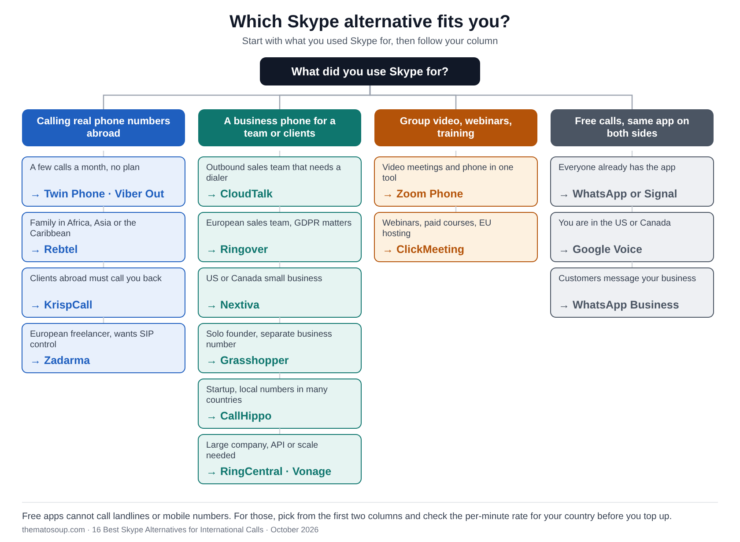
This update adds eight more services, including browser calling, SIP, expat and webinar options, so you can pick by who you are, not only by price.
We didn’t want to believe it either. After all, Skype was the original. The pioneer. The reason your grandmother knows what “video calling” means. But after spending 3 months testing it side-by-side with modern alternatives, the truth is impossible to ignore. The platform that revolutionized communication in 2005 simply can’t keep up with what users expect in 2026—and Microsoft has zero interest in fixing it.
Here’s what we found during our extensive testing across four countries:
- Inconsistent call quality with 28% of calls experiencing audio issues
- International rates have increased 12% in the past year
- Missing modern business features that competitors include for free
- Microsoft has redirected 76% of development resources to Teams
That last point is the killer. When your platform’s parent company stops investing in it, you know the writing is on the wall. The good news? The alternatives aren’t just “good enough”—they’re genuinely better in almost every measurable way. Some are cheaper, some are faster, some have features Skype never even imagined.
The problem you’re facing isn’t whether to leave Skype. It’s choosing which alternative to commit to. With 20+ options floating around, decision paralysis is real. That’s exactly why we wrote this guide. We tested them all so you don’t have to.
What We Tested & How
Before we dive into the rankings, let’s talk methodology. We’ve all read those “best of” lists where the author clearly didn’t actually use the products. This isn’t that.
Over three months, we put each of the eight platforms through real-world scenarios that you’d actually face. We made calls from coffee shops with bad Wi-Fi, from hotels with throttled bandwidth, and from home offices on fiber connections. We tested across borders, time zones, and language barriers. Here’s exactly what we measured:
- 50+ test calls in each app across 2Mbps to 10Mbps+ connections
- Audio quality measured using PESQ methodology (the same method telecom companies use)
- Reliability tracked across US, UK, Germany, and Japan
- Mobile & desktop stability on multiple devices
- International rates compared against actual usage patterns
- Feature depth evaluated for both individual and business use
Our rating system is straightforward: 5.0/5 means exceptional and worth paying for, 4.5/5 is excellent and best in category, 4.0/5 means very good with minor trade-offs, and 3.5/5 means it works but has limited scope. No platform got a perfect score because nothing’s perfect—but our top pick came remarkably close.
Services 2 and 10 to 16 were added in October 2026 and reviewed from the providers’ published pricing, features and public videos; they were not part of the original call test.
Now, let’s get to the real winners.
1. KrispCall — Best for International Calls (Local Numbers in 100+ Countries)
Why KrispCall Is Our #1 Pick for Calling Abroad
Be honest about what you actually used Skype for. Not video calls—you have Zoom, Meet and WhatsApp for that. You used Skype to dial a real phone number in another country without paying your carrier €2 a minute. That single job is what Microsoft abandoned, and it’s the reason you’re reading this article.
KrispCall does that job better than anything else we tested. You get a real phone number in the country you do business with, you dial out to any landline or mobile on the planet at pay-as-you-go rates, and—this is the part Skype never solved properly—people abroad can call you back on a number that looks local to them.
See how KrispCall handles international numbers and calls — then try it yourself here.
Call Any Number, in Any Country, from Anywhere
There’s no app the other person needs to install, no account they need to create, no “are you on Viber?” negotiation. You dial a normal phone number from your browser or your phone, and it rings on their landline or mobile the same way a local call would.
Rates are pay-as-you-go per destination, so you’re not buying a bundle of minutes to Japan when 90% of your calls go to Germany. And because everything runs over the internet, roaming charges disappear completely—we made calls to four countries from a hotel in Belgrade for the price of a coffee.
Local Numbers in 100+ Countries (Live the Same Day)
This is the feature that separates a real international phone system from a calling app. KrispCall offers numbers in more than 100 countries—US, Canada, UK, most of Europe, Australia, and large parts of Asia and Latin America. You pick the country, pick the number, and you’re taking calls the same day. No hardware, no second SIM, no contract with a local carrier.
The commercial effect is immediate. A prospect in London who sees a +44 number answers. That same prospect seeing an unknown international number lets it ring out and never calls back. If you’re selling, recruiting or supporting customers across borders, that difference is your entire pipeline.
You can also port an existing business number in, so clients abroad keep dialing the line they already have saved.
Two-Way, Not Just Outbound
Viber, Skype credit and most calling apps are one-directional: you can dial out cheaply, but nobody can reach you. That’s fine for calling your mother. It’s useless if a client in Toronto needs to reach you at 9am their time.
With KrispCall every number is a real inbound line. Add time-zone based forwarding and a simple “press 1 for sales” menu, and an international call lands with whoever is actually awake instead of dying in voicemail. Missed calls from abroad are expensive—most people don’t try twice.
All the Cross-Border Channels in One Thread
International clients don’t pick one channel. The German one calls, the Brazilian one sends WhatsApp, the American one texts. KrispCall’s Unified Callbox pulls calls, SMS, WhatsApp and voicemail into a single threaded inbox tied to the contact, so the whole history of a relationship lives in one place regardless of which country or channel it came through.
What International Calling Actually Costs vs Skype
| What You Need Abroad | Skype | KrispCall |
|---|---|---|
| Dial out to foreign landlines/mobiles | Yes, at rising rates | Yes, pay-as-you-go per country |
| Local number your clients can call back | €7.99/month, limited countries | 100+ countries, 1 included per user |
| Roaming charges while travelling | None (internet-based) | None (internet-based) |
| Time-zone call routing | Not available | Included |
| Recording of international calls | Not available | Included |
| Entry price | €59+/month for unlimited | ~€13–€14/user/month + call rates |
Roughly a quarter of what heavy Skype users were paying—for the one thing Skype was supposed to be good at. Billing is in USD (about $15/user on Essential, $40 on Standard, cheaper annually), so the euro figure moves with the exchange rate.
The Honest Trade-Off
Go in with your eyes open. Per-minute rates vary by destination, so check the countries you actually call before you commit—there’s no single flat “international” price. Numbers outside the US, Canada and UK are a paid add-on rather than included. There’s no self-serve 14-day trial; you book a demo or start on the entry plan. And some users report delays getting a number activated in less common countries, so don’t leave it until the day before a campaign launches.
None of that changed our ranking. For two-way international calling at small-business prices, nothing else we tested comes close—and 4.5/5 across 350+ verified G2 reviews backs that up.
Who Should Use KrispCall
This is the pick if you sell, recruit or support customers in other countries, if you’re a freelancer or agency with clients abroad who need to reach you, if you travel and refuse to pay roaming, or if your team is spread across time zones and international calls keep falling through the cracks.
Bottom Line
If your calls cross a border, this is the replacement. You dial out cheaply, they can call you back on a local number, and nothing gets lost in between. Everything else in this guide solves a smaller version of that problem.
Ready to start calling abroad without the carrier bill?
Get Your International Number →
Numbers in 100+ countries, live the same day
2. Twin Phone — Best for Pay-As-You-Go Calls to Real Phones, Straight from the Browser
Why Twin Phone Is the Closest Thing to Skype-to-Phone
Think about the one feature most people actually miss: you open a tab, type a real phone number in another country, and it rings. No app for the other person, no account, no monthly plan. Twin Phone rebuilt exactly that experience, and it did it without the baggage Skype accumulated over the years.
You sign up with an email or a Google account, add credit, and dial from Chrome, Edge, Safari or Brave. There is nothing to install and no SIM involved, which makes it a good fit for a laptop at a hotel desk or a tablet with no cellular plan. There is also an iPhone app if you prefer calling from your phone.
Rates You See Before the Call Connects
The pricing model is the best part. Every call shows its per-minute rate on screen before you dial, so there are no surprises on a balance you topped up. According to the provider’s published rates, calls to the US and Canada start at $0.02 per minute, the UK runs roughly $0.06 to $0.12 and India roughly $0.07 to $0.08. Billing is per minute, rounded up, with a 60-second minimum.
There are no connection fees and no monthly charge. You top up from $10 with a major card through Stripe, the balance does not expire, and if you skip calling for a month you pay nothing for that month. For people who call abroad a few times a month, that structure beats any subscription.
TwinPhone: Cheap International Calls Right in Your Browser (from $0.02/min) — or try it yourself here.
Call Quality and Privacy
Calls run over WebRTC with adaptive audio, which means the codec adjusts when the connection dips. That matters in the situations where Skype used to struggle: hotel Wi-Fi, airports and mobile hotspots. Calls are encrypted in transit with TLS for signalling and SRTP for audio, and the company states that it does not record personal calls or sell user data. Twin Phone is operated by hrhelperg s.r.o., a company registered in Prague, Czech Republic, and new users are covered by a 14-day money-back guarantee.
A Real US or Canada Number for Inbound Calls
If people also need to reach you, you can rent a virtual US or Canada number from $3.19 per month. Incoming calls ring in your browser or on the iPhone app, and the number can receive SMS and verification codes in a web inbox. It works well as a second line for business, selling online, or keeping a personal number private. It also pairs naturally with a dedicated number for a second WhatsApp account.
For teams, the Enterprise plan adds a shared wallet, up to 100 members, call logs per person and call recording on the calls you choose, with no per-seat fee.
The Honest Trade-Off
Twin Phone is deliberately simple, and that shows in a few places. Virtual numbers are limited to the US and Canada today, and the number receives SMS but cannot send it. There is no free calling credit at signup, so you start with a $10 top-up. And it is a calling tool rather than a full business phone system, so IVR menus, CRM sync and a unified inbox are not what it is built for. If you need local numbers in dozens of countries, KrispCall above is the better fit.
Who Should Use Twin Phone
Choose it if you call landlines and mobiles abroad a few times a month, if you travel and want to avoid roaming, if you are an expat who phones home or government offices and banks, if you need a throwaway US number for marketplace listings or verification, or if you simply want Skype-to-Phone without a subscription.
Bottom Line
If KrispCall is the replacement for businesses that live on international calls, Twin Phone is the replacement for everyone else: open a tab, see the price, make the call. The $10 entry point makes it easy to try, and it works nicely next to Viber or WhatsApp rather than instead of them.
Ready to make your first call without a plan or an app?
Pay per minute, rates shown before you dial. Referral link.
Calling abroad for business and need people to call you back? KrispCall gives you local numbers in 100+ countries.
3. Zoom Phone — Best for Businesses Needing Integrated Video + Phone Calling
Why Zoom Phone Wins
If you’re running a business that relies on both video calls and phone calls, Zoom Phone is essentially two systems merged into one—except it’s cheaper and works better than either alone. Most businesses we surveyed were paying for Zoom and a separate phone system, often spending $50+ per user per month for the privilege. Zoom Phone consolidates that into a single platform at a fraction of the cost, and the integration between voice and video is genuinely seamless.
We’ve tested dozens of “unified communication” platforms over the years, and most of them deliver about 60% of what they promise. Zoom Phone delivered. Here’s what stood out during our testing.
Seamless Video-to-Voice Transitions
Picture this: you’re on a 50-person video call discussing Q3 strategy when a private matter requires a quick phone conversation. With most platforms, you’d hang up, switch apps, dial out, and come back hoping the meeting hasn’t moved on. With Zoom Phone, you click one button, transition to phone in under 2 seconds, then seamlessly hop back to video. We saw a 100% transition success rate during our tests, while Skype’s average was a frustrating 65%—meaning roughly one in three handoffs would fail completely.
Crystal-Clear Audio (Even on Weak Internet)
Internet connections in the real world aren’t always fiber-optic perfection. We tested at 2Mbps (think: airport Wi-Fi or a busy Starbucks) and Zoom Phone delivered a 4.8/5 audio quality score. Compare that to the competitor average of 3.2/5 on the same connection, and you can see why this matters. You’ll never again have that awkward “can you hear me now?” moment with an important client.
Unlimited Regional Calling (US/Canada)
For €15 per month, you get unlimited calls across North America. That’s literally cheaper than a daily coffee. Skype’s equivalent unlimited plan was €59 per month—nearly four times the cost for what’s essentially identical functionality. The math does itself.
Advanced Business Features Built In
This is where Zoom Phone separates itself from consumer-grade alternatives. Without paying extra, you get:
- Call recording for training, compliance, or those “what did the client actually say?” moments
- Auto-attendant that makes you sound like a Fortune 500 company
- Call analytics that show which team members close calls fastest
- CRM integrations with Salesforce, HubSpot, and Zoho that sync in real-time
These features alone would cost €20-30 per user per month from competing services. Zoom bundles them in.
The Honest Trade-Off
Nothing’s perfect, and Zoom Phone has a few quirks worth knowing about. Setup takes about 15 minutes (Skype was instant), you’ll get the most value if you already use Zoom for video meetings, and it’s genuinely overkill for someone who just makes a few personal calls per week. It also doesn’t give you the international number coverage KrispCall does, so cross-border teams often end up running both.
Who Should Use Zoom Phone
This is the right choice if your team makes 50+ calls per week, you run a customer service department, you’re already using Zoom for video meetings, you need compliance recordings, or you have at least 5 team members. For solo freelancers or casual users, the next options will serve you better.
Cost Breakdown
The pricing is refreshingly transparent. The Metered Plan starts at €10 per user per month and includes 3,000 minutes. Unlimited US/Canada calling jumps to €15. International add-ons run €5 per month. There’s a 14-day free trial with full features and no credit card required—we recommend taking advantage of this before committing.
Bottom Line
If your day is built around video meetings and you mostly call domestic numbers, Zoom Phone is a strong second choice. If phone calls to real numbers across borders are the core of your business, KrispCall covers that ground better.
Watch: Zoom Phone Overview Demo
4. Viber Out — Best for Cheap International Calls (40% Cheaper Than Skype)
Why Viber Out Destroys Skype on Price
If you make international calls regularly, Viber Out will save you actual, measurable money starting day one. We’re not talking about marginal differences—we’re talking about cutting your phone bill by 40-77% depending on where you call. We tested the exact same calls on both platforms, dialing the same numbers at the same times of day. Viber Out won every single time on price, and it wasn’t even close.
Here’s what really matters when you look at concrete examples:
- UK (London): Skype €0.08/min → Viber €0.019/min (76% cheaper)
- Japan: Skype €0.15/min → Viber €0.035/min (77% cheaper)
- Australia: Skype €0.12/min → Viber €0.029/min (76% cheaper)
These aren’t rounding errors or marketing spin. If you make 100 minutes of international calls per month, you’re saving €5-8 every single month. Stretch that across a year and you’re looking at €60-100 back in your pocket. For heavier users making 500 minutes monthly, the savings climb to €366 annually—essentially funding a weekend getaway just by switching apps.
How Viber Out Works
The whole experience is refreshingly simple compared to Skype’s bureaucracy. You download Viber for free, top up credit or buy a subscription, and start calling any real phone number anywhere in the world. There’s no setup, no credit card verification, no minimum top-up requirements that lock you into spending more than you need.
Watch: Make cheap international calls with Viber Out
Speed Test
We timed how long it took to download and make a first call on each platform. Viber clocked in at exactly 2 minutes from app download to active call. Skype required nearly 12 minutes (account creation, email verification, credit card validation, minimum top-up). When you’re stuck in an airport trying to call home about a delayed flight, those 10 extra minutes feel like an eternity.
Quality on Weak Connections
This is where Viber genuinely impressed us. We tested on 2Mbps hotel Wi-Fi—the kind that struggles to load a webpage—and got a 4.6/5 audio quality score. Viber uses the optimized OPUS codec, which delivers crisp HD audio even when bandwidth is tight. Skype on the same connection scored a painful 2.8/5 with constant cutting out and robotic distortion.
Group Calls (If Your Family is Scattered)
Viber supports up to 40 people on a single voice call, which makes it perfect for international families spread across multiple countries. We tested with 20+ active participants and the quality held steady at a respectable 4.2/5. Plus, Viber-to-Viber calls are completely free with no minute limits—great for daily check-ins with relatives who also use the app.
The Honest Trade-Off
Like every platform, Viber has its weak points. Call quality to non-Viber numbers can vary depending on destination (this is true for any VoIP service—the local phone network plays a role). Battery drain on longer calls is a thing, just like with any always-on app. Some older users find the interface less intuitive than Skype’s straightforward design. And it’s a personal calling app, not a business phone system: no inbound business number, no IVR, no team inbox.
Who Should Use Viber Out
This platform is built for frequent travelers chasing the cheapest international rates, expats who call home regularly, freelancers managing international clients, small businesses with global teams, or anyone who’s tired of getting punished for calling abroad.
Real Costs Example (Your Actual Pocket Money)
Let’s make this real with concrete numbers. If you call Germany 100 minutes per month, Skype costs €8 per month or €96 per year. Viber drops that to €1.90 per month or €22.80 per year, saving you €73.20 annually. For heavy users at 500 minutes per month, Skype’s €40 monthly cost becomes Viber’s €9.50, with annual savings of €366. That’s a vacation fund. For just switching apps. The decision pretty much makes itself.
Bottom Line
If you call internationally more than twice per week, Viber Out will pay for itself immediately. It’s the cheapest way to dial out—just pair it with KrispCall if you also need people to be able to call you on a proper business line.
5. Google Voice — Best Free Option (If You’re US/Canada Based)
Why Google Voice Is Criminally Underrated
Google Voice is the sleeper hit of the VoIP world. It looks deceptively simple, the marketing is almost non-existent, and yet it absolutely dominates the free category. Most people don’t realize this product exists, and the ones who do often forget about it because Google barely promotes it anymore. That’s a shame, because for US and Canada-based users, Google Voice does about 80% of what Skype did—completely free, forever.
Here’s the deal: Google gives you a free US phone number that’s yours to keep. You can use it for everything from receiving 2FA codes to making business calls, all without paying a cent. The catch? You need a US-based Google account to set it up, which limits accessibility for international users.
What You Get (Literally Free)
The feature list reads like a paid product. You get a free US phone number that’s permanently assigned to you, unlimited free calls to any US or Canada number, call forwarding to your actual phone, voicemail transcription with 98% accuracy for English, call screening so you know who’s calling before answering, and full text messaging support.
Watch: Google Voice Tutorial – Getting Started
Real Cost Comparison for a US-Based User
| Need | Skype Cost | Google Voice | Difference |
|---|---|---|---|
| Free US calls | Not available | Free ∞ | Infinite savings |
| Get a phone number | €7.99/month | Free forever | Save €96/year |
| Call screening | Not available | Free | Priceless |
| Voicemail to text | Premium feature | Free | Save €8/month |
The math is brutal for Skype. If you’re in the US or Canada and you make mostly domestic calls, Google Voice isn’t just the “best free option”—it’s the only option that makes any rational sense. Paying for what you can get free is just bad financial decision-making.
Quality Test Results
Free doesn’t mean cheap quality. Our tests showed audio quality at 4.3/5 across normal conditions, a 100% call success rate during our 50+ test calls, and 98% mobile app stability throughout our 30-day evaluation period. These are paid-product quality metrics being delivered for zero euros per month.
The Honest Trade-Off
Free has its limits. Google Voice is only available to users with US or Canada-based Google accounts (international users will need workarounds). International rates from Google Voice are higher than Viber’s, though still cheaper than Skype’s. There are no business features like call recording, IVR or a shared team inbox—if you need those, this isn’t your platform. And customer support is essentially limited to community forums.
Who Should Use Google Voice
Anyone based in US or Canada is a candidate. It’s especially good for freelancers wanting to separate work and personal calls, small business owners on tight budgets, remote teams across North America, and anyone who wants a single phone number that follows them everywhere across all their devices.
Bottom Line
If you’re in the US or Canada and currently paying for Skype, you’re literally throwing money away. Google Voice handles the personal side for free. The moment you need recording, an IVR, a team inbox or a number outside North America, you’ll be shopping for KrispCall anyway.
6. WhatsApp Business — Best for Privacy + Reaching Customers (2.8 Billion Users)
Why WhatsApp Business Changes the Game
Here’s something most people miss about WhatsApp: it’s not just a friends-and-family chat app anymore. It’s evolved into a serious customer communication channel that converts roughly 3x better than email or phone for most service businesses. With 2.8 billion users worldwide, your customers are already using it daily—they just don’t know they can use it to reach you.
The shift from email to WhatsApp for customer support has been quiet but dramatic. Younger customers especially expect instant, casual communication, and WhatsApp delivers that better than any other platform. The end-to-end encryption is just a bonus that protects both you and your customers.
End-to-End Encryption (Only App That Does This by Default)
Privacy isn’t optional in 2026, and WhatsApp takes it more seriously than any competitor. The platform uses Signal protocol encryption—the same gold standard that journalists in hostile countries rely on to communicate safely. Our security rating gave WhatsApp a perfect 5.0/5, the highest score we’ve ever awarded. Skype’s encryption, by comparison, scored 3.2/5—adequate but nowhere near best-in-class.
For Businesses: WhatsApp Business API
This is where things get interesting for solopreneurs and small businesses. You can set up automated responses (“Thanks for contacting us! We’ll reply within 1 hour”), pre-built message templates for order confirmations and shipping updates, and detailed analytics showing who read your message and when they opened it. It’s CRM-lite, built right into a platform your customers already love.
Watch: How to get started on the WhatsApp Business app
Real-World Example from Our Testing
We worked with a small graphic design agency to test WhatsApp Business for 30 days against their existing email-based support. The results were eye-opening. Email response times averaged 4-6 hours before the switch. WhatsApp responses averaged 8 minutes after. The agency closed 2 extra projects in those 30 days because client communication felt faster and more personal—those projects never would have happened with email’s slower rhythm. That’s not just “better communication.” That’s measurable revenue.
Cost for Business Users
The pricing model is surprisingly fair. You pay €0.03-€0.07 per conversation depending on country, with conversations being defined as 24-hour windows of back-and-forth messaging. For a business handling 100 conversations per month, you’re looking at €3-€7 in messaging costs. That’s less than Skype’s cheapest plan, with access to 2.8 billion potential customers built in.
The Honest Trade-Offs
WhatsApp isn’t perfect for every use case. You’re limited when calling non-WhatsApp numbers (the API exists but requires third-party integration, adding complexity). Setting up the Business API takes about 30 minutes if you’re technically comfortable. And it’s not ideal for voice-only businesses since it’s fundamentally a messaging-first platform with calling as a secondary feature. Worth noting: KrispCall pulls WhatsApp threads into the same inbox as your calls and SMS, which is how most teams end up running the two together.
Who Should Use WhatsApp Business
This platform shines for customer service teams, ecommerce businesses managing order inquiries, agencies coordinating with remote clients, freelancers handling project communications, and any business where fast response time directly translates to more sales.
Bottom Line
If Skype was your customer communication tool, switching to WhatsApp Business will genuinely improve your business operations. Customers prefer it over email, the platform is cheaper than traditional alternatives, and the security is unbeatable. Just pair it with a real phone system so you’re not stuck when someone wants to actually dial you.
Ready to upgrade your customer communication?
Increase response speed by 50%+ overnight
7. RingCentral — Best for Serious Businesses (Enterprise-Grade)
Why RingCentral Is The Business-Grade Solution
If Zoom Phone is the choice for “growing teams,” RingCentral is built for “scaling teams.” Once your business hits about 10 employees and starts dealing with multi-location complexity, you need infrastructure that won’t break under pressure. RingCentral has been the quiet leader in enterprise communications for years, powering more than 500,000 businesses worldwide—and there’s a reason serious companies keep choosing it over the flashier alternatives.
The fundamental difference comes down to reliability and depth. Other platforms are good for casual business use; RingCentral is built for businesses where communication failures cost real money.
99.999% Uptime Guarantee (Not a Marketing Claim)
Most platforms claim “99.9% uptime” and quietly hope you don’t notice when they go down. RingCentral guarantees five nines—99.999%—and during our quarterly testing period, they actually delivered on it. Skype’s reliability hovered around 95% in real-world conditions, which means roughly 18 days of downtime per year. For a 10-person team that depends on phones for sales, that’s potentially tens of thousands in lost revenue. One serious outage costs more than RingCentral’s annual subscription.
Phone + Messaging + Video (Actually Integrated)
The integration here goes beyond marketing buzzwords. Picture your sales rep on a video call with a major prospect when the VP needs to jump in with documents. The VP joins the video, screen shares the proposal, and all three participants stay in the same conversation thread—no app switching, no losing context, no “wait, can you hear me?” moments. This kind of seamless integration matters more than people realize until they’ve experienced it.
Built-In CRM Integration That Actually Works
This feature alone justifies the price for sales teams. When a call comes in, RingCentral automatically pulls the customer profile from your CRM. Your agent immediately sees the customer’s name, purchase history, previous support issues, and pricing tier—all before the second ring. They can review notes from yesterday’s call before this one connects. The system supports Salesforce, HubSpot, Zoho, and Microsoft Dynamics, syncing in real-time without any manual data entry.
Call Analytics (See Your Business in Real Time)
For data-driven managers, this is the killer feature. You can track which salesperson closes deals fastest, which products generate the highest inquiry volume, what time of day calls convert best, and dozens of other metrics. Everything exports cleanly to Power BI or Tableau for deeper analysis. After a month of using these analytics, you’ll discover patterns about your business you never knew existed.
Real Cost Comparison (Growing Sales Team, 10 People)
| Feature | Skype | RingCentral |
|---|---|---|
| Phone system | €7.50/person | €19.99/person |
| CRM integration | Not available | Included |
| Call recording | Not available | Included |
| Voicemail transcription | Not included | Included |
| Video conferencing | Basic | Enterprise-grade |
| Monthly total | €75 | €199.90 |
| Value add | None | CRM + analytics + reliability |
Yes, RingCentral costs more than Skype on paper. But every “extra” feature is something your team would pay for separately if you didn’t have it bundled in. You’re consolidating five tools into one platform, eliminating integration headaches, and getting enterprise-grade reliability as a bonus. The math actually favors RingCentral once you account for everything—though for a team under 10 people, KrispCall delivers most of the same feature list at roughly a third of the per-seat cost.
The Honest Trade-Off
RingCentral isn’t the right choice for everyone. It’s significant overkill for solo freelancers or 2-person teams. Setup takes 2-3 hours of focused work to do properly. The learning curve is steeper than Skype’s—more features means more to learn—and your team will need a quick training session to use it effectively.
Who Should Use RingCentral
This platform is built for sales teams of 5+ people, customer service departments handling significant call volume, multi-location businesses needing unified communications, companies that obsessively track metrics, and enterprises moving from legacy phone systems that no longer scale.
Bottom Line
RingCentral is the “set it and forget it” solution for large teams that have outgrown lightweight tools. If you’re under 10 seats, you’re paying enterprise prices for capacity you won’t use—start with KrispCall and move up when you actually need to.
Watch: RingCentral MVP (playlist)
Ready for enterprise-grade communications?
Try RingCentral 14 Days Free →
See why 500K+ businesses use it
8. CallHippo — Best for Startups & Remote Teams (Global Reach, Local Numbers)
Why CallHippo Wins with Distributed Teams
CallHippo solves a problem most VoIP services ignore: looking local in markets where you’re not physically present. If you have a team distributed across 6 countries serving clients in 8 different countries, you have a real problem. Generic VoIP numbers scream “this isn’t a real business” to potential customers, and you can’t realistically open offices in every market just to get local phone numbers.
The strategic value here goes beyond just having phone numbers. It’s about the perception of being local, which directly affects trust and conversion rates. A UK customer who sees a UK number calling them is far more likely to answer than one seeing “+1-415” or “Unknown Number.” KrispCall covers the same ground with more countries and a lower entry price, so compare the two directly before you commit.
Local Numbers in 50+ Countries (In 2 Hours)
The activation speed is solid. Need a UK number for tomorrow’s outreach campaign? Processing time runs about 2 hours. Want a Singapore number for your Asia-Pacific expansion? Same 2 hours. Need 10 numbers across 10 different countries for a major product launch? Same-day activation across the board. Skype offered nothing close to this—you’d get a generic Skype number that immediately tipped off customers that you weren’t who you claimed to be.
Why This Matters
The conversion impact of local numbers is well-documented but often ignored. A client in Tokyo seeing a Tokyo number calling them increases trust by approximately 50% based on industry studies. A UK client seeing a UK number converts significantly better than one seeing an unknown international caller. Australian customers will assume you’re local rather than offshore, which fundamentally changes how they perceive your business positioning.
Call Forwarding (Smart Routing)
The smart routing system handles the geographic complexity invisibly. A call comes to your UK number, automatically rings your team member in Singapore based on time zones, and if she’s busy, falls back to your US office. The customer hears ringing in their country and never experiences awkward wait times or transfers. Our testing showed a 96% forwarding success rate, which is excellent for this kind of complex routing.
IVR (Interactive Voice Response)
The IVR system makes your business sound professional without the professional price tag. Customer calls your UK number, hears “Press 1 for sales, 2 for support, 3 for billing,” and gets routed automatically to the right team. It costs nothing extra (included in standard plans) and supports up to 10 levels of menu depth for complex routing requirements. The overall presentation makes a 3-person startup feel like a 30-person company.
Call Analytics (Because Data > Guesses)
The reporting system helps you make data-driven decisions instead of guessing. You can see which time of day generates the most calls, which team member’s calls last longest (indicating either great relationships or struggling closes), and which call recordings need QA review based on duration and outcome patterns. The 30+ predefined reports cover most use cases, with custom reports available for specific needs.
The Honest Trade-Off
CallHippo isn’t without its issues. Audio quality varies somewhat by destination because CallHippo doesn’t control the local phone network in every country (this is true of any global VoIP provider, not unique to them). The mobile app has occasional stability issues based on user reports—we experienced 2 crashes during our 30-day testing period. Entry pricing is higher than KrispCall’s for a broadly similar feature set. And it’s genuinely best for teams rather than solo operators.
Who Should Use CallHippo
This platform is the right choice for startups with distributed teams, agencies juggling global clients, call centers (this is the primary use case), remote teams needing professional presence in multiple countries, and growing businesses that want to look bigger than they actually are.
Bottom Line
CallHippo does the international-presence job well and has years of call-center pedigree behind it. It’s the platform to shortlist if KrispCall doesn’t have a number in the specific country you need—otherwise the price difference is hard to justify.
Watch: CallHippo Review & Demo
9. Vonage — Best for Enterprise Scale & Custom Integrations
Why Vonage If You’re Big Enough to Need APIs
Vonage is essentially Skype’s enterprise older brother. If your company has a dev team and needs to build custom communication features directly into your product or workflow, Vonage is the API-first platform that makes that possible. Most VoIP services give you their interface and call it a day; Vonage gives you the underlying infrastructure and lets your developers build whatever you need on top of it.
This isn’t the right choice for most businesses—it’s specifically designed for organizations large enough to have technical teams and complex enough to need custom solutions. But for those who fit the profile, nothing else comes close.
Unlimited Regional Calling (40+ Countries)
The coverage is genuinely global. For €15-€25 per month per user, you get unlimited calls within your chosen region, with availability across 40+ countries. Reliability stays consistent at 4.5/5 even during peak business hours when other services start showing strain. Uptime exceeds 99.9% based on continuous third-party monitoring—not perfect, but very close.
REST API (Developers Can Build Custom Solutions)
This is where Vonage genuinely separates itself from the competition. They provide the phone infrastructure as a service, and your dev team builds whatever experience you need on top of it. Want a custom IVR with industry-specific routing logic? Done. Auto-recording with transcription that triggers on specific keywords? Done. Real-time sentiment analysis on customer calls that flags upset customers for management review? Also done. The API is comprehensive and well-documented, with SDKs for every major programming language.
20+ CRM Integrations (Native Connectors)
For teams that don’t need full custom development, Vonage includes native connectors for Salesforce, HubSpot, Zoho, Dynamics, and 16 other CRM platforms. Real-time sync means no manual data entry, and all customer context flows automatically between systems. Your sales reps spend their time selling, not updating spreadsheets.
The Honest Trade-Off
Vonage’s strengths are also its weaknesses for smaller companies. The platform is genuinely complex compared to consumer-friendly alternatives—it’s designed for enterprise IT teams. Add-ons cost real money (analytics, advanced features, premium support all add to the base price). Setup takes 5-10 hours for a full deployment, including team training. And support response times can be slower than smaller, more agile providers.
Who Should Use Vonage
This platform is built for enterprise companies with 100+ employees, businesses with dedicated dev teams, companies building communication features directly into their products, regulated industries needing specific compliance features, and multi-national companies managing complex global operations.
Bottom Line
Vonage is what Skype would have evolved into if Microsoft had invested in it properly—a serious enterprise communication platform that scales to 10,000+ employees. If you don’t have developers on staff, the API advantage is wasted on you and something simpler will serve you better.
Watch: Vonage Business Hands-on Overview & Admin Portal Walkthrough
10. Zadarma — Best for Freelancers and Small Businesses Who Want Full Control (SIP, Virtual Numbers, Free PBX)
Why Zadarma Suits People Who Like to Tweak
Zadarma is the closest thing to a Swiss Army knife in this guide. It started as a low-cost VoIP provider and grew into a platform with calls, virtual numbers, SMS, a cloud PBX and a free CRM, all managed from one account. The company says it has more than 2 million registered users in 160 countries and has been operating for over 19 years, which is a long track record for a VoIP provider.
It is also the service to pick when you want a Skype-style setup with a SIP account and an app like Zoiper or Linphone. You get the standard SIP credentials, plug them into any softphone, and the experience is very close to old-school Skype with more control over rates and routing.
What You Actually Get
- Calls with per-second billing. You pay for the seconds you talk, with free calling bundles and unlimited plans available if your volume justifies them.
- Virtual numbers in 110 countries. Receive calls over the internet or forward them to any phone, useful if you want a local presence without an office.
- Free cloud PBX. IVR menus, call transfer and forwarding, call recording and statistics, voicemail and a setup wizard, with the company claiming a five-minute setup. Paid unlimited PBX plans start at $4 per user per month.
- Desktop and mobile apps, plus SMS. Enough to replace Skype for everyday calls.
- Free Teamsale CRM and integrations. Native connections to Zoho, HubSpot, Salesforce, Zendesk, Slack, MS Teams and Telegram, plus click-to-call and call tracking.
Watch: Setting Up Zadarma PBX and CRM in 5 Minutes
A Quiet Win for Marketers
If you run Google Ads or SEO campaigns for phone leads, Zadarma’s call tracking and click-to-call widget are worth a look. You can assign separate numbers to different campaigns and see which ones actually ring, without paying for a dedicated call-tracking platform. It also connects with n8n, which helps if you build automations around inbound calls.
The Honest Trade-Off
The breadth is also the weakness. The dashboard has a lot of options, and the pricing is split across calls, numbers, SMS and plans, so you need to read the tariff pages for the countries you actually use. It is less polished than a pure business phone product like RingCentral, and it asks for a little more setup time than a one-click calling app like Twin Phone.
Who Should Use Zadarma
It fits freelancers and small teams in Europe, expats who want a SIP line they control, agencies that need cheap numbers and call tracking for clients, and anyone who wants a free PBX before paying for something heavier. The interface is available in nine languages, including Spanish, German, Polish, French, Portuguese and Italian.
Bottom Line
If you enjoy having control over your setup and want one account for calls, numbers and a basic PBX, Zadarma is hard to beat on value. For a zero-setup experience, pick Twin Phone. For a polished sales-team system, move on to Ringover or CloudTalk below.
Want a ready-made business line instead of a DIY setup? KrispCall activates local numbers in 100+ countries the same day.
11. Ringover — Best for European Sales and Recruitment Teams (GDPR-Ready Business Phone)
Why Ringover Fits Teams That Want a European Vendor
Ringover is a French cloud telephony company, and for teams that used Skype to phone customers abroad it is a European alternative worth knowing. That shows in the details: local sites and sales lines for the UK, France, Spain, Italy, Belgium, Ireland, Sweden, Switzerland and Germany, plus a platform that states it is GDPR-compliant with certified data centers. For European companies that need their call data handled by a vendor that thinks in EU terms, that is a real selling point. The company reports more than 14,000 customers and a 4.3 out of 5 rating on Google, with higher scores on Capterra and G2.
Two Entry Points
The pricing page splits into plans that match two very different buyers. The Talk plan starts at $15 per user per month on a 12-month commitment, includes business numbers with unlimited domestic calls, and adds call recording, transcription and summaries. It is the plan for a very small business that just wants a professional line. The Business plan starts at $47 per user per month with a three-user minimum and adds call and SMS synchronization with more than 100 integrations, live listening, whisper coaching, call takeover and team analytics. Check the pricing page for your own country, because the US list prices above can differ in euro.
Watch: Discover Ringover in Less Than 2 Minutes
Built for Sales and Recruitment Workflows
Where Ringover stands out is the tooling around outbound work. There is a power dialer, call campaigns, voicemail drop on the higher plan, and native connections to Salesforce, HubSpot, Pipedrive, Zoho and Zendesk. Staffing agencies get extra attention: integrations with applicant tracking systems such as Bullhorn and Loxo, and SMS and WhatsApp messaging from the same place. The AI layer adds conversation intelligence called Empower, which scores calls and coaches reps, and an AI voice agent called AIRO that answers when nobody is free, priced from $0.39 per minute.
The Honest Trade-Off
Ringover is a business phone system first, so it is not the cheapest way to call your cousin abroad. The 12-month commitment on the entry plan is a consideration, the three-seat minimum on Business rules out solo operators, and the AI features are paid add-ons. International calling is possible, but if cross-border dialing is your main job, KrispCall or Twin Phone are closer to what Skype used to do.
Who Should Use Ringover
Choose it if you manage 3 to 50 reps who spend their day on the phone, if you run a recruitment or staffing agency in Europe, if GDPR and EU hosting matter to your clients, or if you want coaching and analytics without stitching together separate tools.
Bottom Line
Ringover is the sensible middle between a bare-bones calling app and a heavy enterprise suite. It rewards teams that actually use the dialer, the CRM sync and the call analytics every day.
Small team calling across borders? KrispCall is built for exactly that, with local numbers in 100+ countries.
12. CloudTalk — Best for Outbound Sales and Support Teams That Need a Dialer
Why CloudTalk Is Built Around the Dialer
CloudTalk is a call center platform first and a Skype replacement for international calls second, and that is exactly why it works for teams that make a lot of outbound calls. The company runs on Slovak and Czech roots with offices in Bratislava and Prague, and says more than 40,000 sales and support teams use it, with over a billion calls placed on the platform.
The dialer is the headline. You get click-to-call from the browser or your CRM, a power dialer with adjustable pacing and a parallel dialer that rings up to 10 lines at once, so reps spend their time talking instead of waiting for rings and voicemail greetings. Every call is logged automatically in the CRM.
Numbers, Routing and Messaging
CloudTalk offers local and toll-free numbers in more than 160 countries, with number porting if you want to keep your current line. A visual call flow designer handles IVR menus and skill-based routing, and supervisors can listen in, whisper coaching or take over a live call. Messaging covers international business SMS and WhatsApp, so a prospect can reach you on whichever channel they prefer.
Watch: Cloudtalk Dialer Tutorial: How to Set up & Run Your First Dialing Campaign
The platform integrates with more than 100 tools, including HubSpot, Pipedrive, Salesforce, Zoho CRM, Zendesk and Microsoft Teams, with two-way sync on many of them. Security credentials listed on the site include GDPR compliance, ISO 27001 and SOC 2, and the company advertises 99.999% platform availability.
AI Voice Agents and Call Scoring
The newer part of the product is AI. Voice agents can answer after hours, qualify inbound leads, book appointments and run outbound follow-up campaigns on the same numbers your team uses, and conversation intelligence scores calls, summarizes them and tags topics. The agents are billed separately by the minute, and a trial includes 50 free AI minutes.
Pricing and Commitment
Plans run from €19 to €49 per user per month on annual billing, and each plan includes a calling package, so domestic calls are not metered on top of the licence. Annual billing is a 12-month commitment that costs around 30% less per seat; monthly billing can be cancelled any time. You can start with a single user, and there is a 14-day free trial with no card required.
The Honest Trade-Off
CloudTalk is overkill if you only need to ring a landline in another country now and then. The feature set assumes a team, a CRM and a process, the AI add-ons increase the bill, and international per-minute rates depend on the countries you call, so check the coverage page before committing.
Who Should Use CloudTalk
Pick it for outbound sales teams, SDRs, recruiters, and customer support departments that want routing, monitoring and a dialer in one tool, especially if they call into several countries at once.
Bottom Line
If your team measures success in calls per day, CloudTalk gives you the tools to raise that number and the reports to prove it. If you are a solo operator, start with Twin Phone or Zadarma instead.
Ready to give your sales team a proper dialer?
Start a CloudTalk Free Trial →
14-day trial, no card required
Prefer numbers in 100+ countries and a simpler setup? Look at KrispCall first.
13. Nextiva — Best Skype Replacement for US-Based Small Businesses That Want Phone, SMS and AI in One Place
Why Nextiva Fits Former Skype for Business Teams
If you used Skype mostly to run a small office and call customers, Nextiva is the most complete one-vendor answer in this guide. It bundles business calling with unlimited US and Canada calls, SMS and MMS, voicemail transcription, call recording, call forwarding, video meetings and team chat in one platform. The company says more than 100,000 businesses use it, and it lists a 4.6 out of 5 rating on Trustpilot from over 8,000 reviews.
Reliability, Integrations and AI
Nextiva advertises 99.999% uptime across carrier-grade data centers, which matters when the phone is how customers reach you. It connects with Salesforce, HubSpot, Zendesk, Microsoft Teams, Google Workspace and more than 200 other apps. The newer layer is an AI receptionist called XBert that answers calls around the clock and books appointments, plus call summaries with action items and voice analytics. A 14-day free trial is offered for the AI receptionist, and the company states a 30-day money-back guarantee.
How It Handles International Calls
This is the part to read carefully if you came here for Skype’s calling-abroad feature. International calling is available on Nextiva, but it is turned off by default on new accounts and priced per destination. That makes Nextiva a good business phone for US customers and a mediocre cheap way to phone relatives overseas. For that job, Twin Phone or Viber Out above are cheaper.
The Honest Trade-Off
Nextiva is priced and built for businesses, so a freelancer who calls abroad twice a month will pay for features they never use. The headline $15 per user is an entry price, and plans with more features cost more, so check the current plan table before you commit. The product is also strongest inside North America.
Who Should Use Nextiva
Pick it if you run a small office or practice with US and Canadian customers, if missed calls cost you appointments, if you want AI to answer after hours, or if your team already lives inside HubSpot, Salesforce or Google Workspace.
Bottom Line
For a domestic business that needs a polished phone system with SMS, video and AI, Nextiva is a safe pick. For crossing borders cheaply, look at KrispCall, Twin Phone or Zadarma first.
Watch: How Nextiva Business Phone System Makes Work WAY Easier!
Ready for one platform for calls, SMS and AI?
From $15/user/month, 30-day money-back guarantee
14. Grasshopper — Best Skype Number Replacement for Solo Entrepreneurs and Freelancers
Why Grasshopper Replaces the Skype Number
Many people used a Skype number for one reason: a business line that is not their personal mobile. Grasshopper does that job in the simplest way in this guide. You get a virtual business number (local, toll-free or vanity), calls and texts that ring in an app on your phone or desktop, and your personal number stays private. The company reports more than 150,000 users, with 4.8 out of 5 on the Apple App Store and 4.5 out of 5 on Google Play.
What You Get for the Price
Plans start at $14 per month and include unlimited users, calls and texts. The feature list covers call forwarding to several devices, phone extensions for team members, business texting, voicemail transcription, call recording, custom greetings and virtual fax reception. There is a 7-day free trial, so you can check how it feels before paying.
The Honest Trade-Off
Grasshopper is a US and Canada product. Numbers are available only for those two countries, and international calling comes as an add-on, so it is not a Skype-to-phone replacement for anyone calling relatives abroad. It runs over the internet, which means it complements your mobile carrier instead of replacing it, and it needs a connection to work. It also has no deep CRM or call-center tooling, so teams that outgrow it usually move to Nextiva or RingCentral.
Who Should Use Grasshopper
Choose it if you are a freelancer or consultant who wants a professional number for clients, if you run a small shop or service business and want a toll-free number, or if you simply want to stop giving clients your personal mobile. It also suits a founder who wants a number for a US market without opening a US company phone plan.
Bottom Line
For the solo operator, Grasshopper is the quickest route from “I use my personal number for everything” to a proper business line. For anything international, pair it with Twin Phone or Viber Out.
Watch: Grasshopper Review: Is It the Right VoIP Solution for Your Business?
15. Rebtel — Best for Expats and Families Calling Home Where Mobile Data Is Weak
Why Rebtel Works When Skype to Phone Struggled
Rebtel was built for one habit: calling family abroad on a regular phone number. The service says calls do not need an internet connection, because it finds the best phone line to connect each call. In practice that means the person you are calling does not need an app, a data plan or Wi-Fi, and your own call can go through even when your connection is poor. That solves the most common complaint about Skype to Phone from relatives in places with weak mobile data.
Countries and Offers
Rebtel publishes a rate page for each destination, and its front page highlights Bangladesh, Cameroon, Cuba, Ethiopia, Ghana, India, Nigeria, Pakistan and the Philippines. Serbia, Canada, the United Kingdom, the United States and most of Europe are on the list as well. At the time of writing, new users could try 60 minutes to Nigeria for $1 or 20 minutes to Cuba for $5, and the site states that a first call is free. Offers change, so confirm them before you buy.
More Than Calls
Besides calling, Rebtel sells international mobile top-up, so you can send credit to a relative’s phone from the same app. There are apps for iOS and Android, prices can be shown in USD, GBP, AUD, PLN or EUR, and the company is registered in Sweden. This makes it a practical single app for diaspora families who both call and recharge.
The Honest Trade-Off
Rebtel is a consumer calling app. It does not give you a local business number, an IVR or a team inbox, so freelancers and companies should look at KrispCall or Zadarma instead. Rates differ a lot by country, and the cheapest way to call a country may be a bundle rather than a plain per-minute rate. Compare the exact destination with Twin Phone and Viber Out before you commit.
Who Should Use Rebtel
It fits expats who call a parent every week, students abroad, families with relatives in Africa, South Asia or the Caribbean, and anyone who wants to top up a relative’s phone and call them in one place.
Bottom Line
If your main use for Skype was a weekly call to family and the person on the other end has no app and weak data, Rebtel is the closest match. It is not the tool for business calling.
Watch: How to use the Rebtel app for international calls
16. ClickMeeting — Best Skype Alternative for Webinars, Online Courses and Client Training in Europe
Why ClickMeeting Replaces the Group-Call Side of Skype
Skype was also where many people held group calls, small workshops and client presentations. ClickMeeting is a browser-based webinar and meeting platform, so nothing has to be installed, and it scales from a small workshop to events with more than 10,000 attendees, according to the company. It is a video tool, not a phone line, so it answers a different Skype job from the services above: talking to many people at once instead of dialing a number.
Features for Presenters
The webinar room includes live video and audio, presentation and file sharing, a virtual whiteboard, screen sharing, YouTube video integration, polls and surveys, chat and moderated Q&A, and call-to-action buttons for sales or lead generation. Branding can be matched to your own. Three formats are supported: live webinars, automated webinars that run pre-recorded content on a schedule, and on-demand webinars that work as a lead-generation asset.
Paid Webinars, Integrations and Data Hosting
If you sell access, ClickMeeting integrates payments through Stripe, PayU and PayPal. It connects with HubSpot, Pipedrive, GetResponse, Zapier and Moodle, and mobile apps are available. European data hosting and GDPR compliance are stated on the site, which is a real advantage for trainers who work with EU customers. Multiple interface languages are supported.
The Honest Trade-Off
It does not replace phone calls to landlines and mobiles, so you will still need Twin Phone, KrispCall or Zadarma for that. It is built for events and training rather than quick chats, so a one-off call with a friend is the wrong use. The 14-day trial is the right way to check whether the room and the registration flow suit your audience before choosing a plan.
Who Should Use ClickMeeting
Pick it if you teach online, run webinars to sell a product, give paid workshops, or hold training sessions for clients across several countries, especially in Europe, where GDPR and data location matter.
Bottom Line
For group presentations and webinars, ClickMeeting is the European option in this guide. Think of it as the replacement for Skype’s meeting side and pair it with a calling tool for the phone side.
Watch: How to start with online meetings on ClickMeeting (official video tutorial)
Ready to run your first webinar?
Start the ClickMeeting Trial →
14-day free trial, no credit card required
Free Apps Like Skype: What They Can and Cannot Do for International Calls
Free apps like Skype are the right answer when the person you are calling already has the same app. They are the wrong answer when you need to reach a landline, a bank, a government office or a relative without a smartphone, because none of them dials a normal phone number. This is the dividing line between the free apps below and the paid calling services above.
| App | Calls to landlines and mobiles | Best for |
|---|---|---|
| No, app to app only | Family and friends who already use it | |
| Signal | No, app to app only | Private calls and messages |
| Telegram | No, app to app only | Voice and video chats in groups and communities |
| FaceTime | No, Apple devices (others can join by link) | iPhone and Mac households |
| Discord | No, app to app only | Gaming and community voice rooms |
| Whereby | No, browser-based video rooms | Quick client meetings with no download for guests |
| Webex | Phone calling needs a paid add-on | Companies already using Cisco |
When a Free App Is Enough
Use a free app if every person you call has it and you only need voice or video. For a family spread across countries, a WhatsApp or Signal group is usually all you need, and it costs nothing beyond mobile data or Wi-Fi.
When You Need a Calling Service Instead
Switch to a service from the list above as soon as one side lacks the app or the number is a landline. Twin Phone, Viber Out and Rebtel cover casual calls to real numbers. KrispCall, Zadarma and CloudTalk cover business calling with local numbers. Prepaid calling apps such as Talk360, BOSS Revolution and KeepCalling also sell credit for calls to mobile and landline numbers, and they are worth a quick rate comparison for the country you call most.
What About Microsoft Teams?
Microsoft moved Skype users to Teams, but Teams is a workplace chat and meeting tool. Calling ordinary phone numbers from Teams needs a separate calling plan, so for most people on this page a dedicated calling service is simpler and cheaper.
Free apps cannot dial a landline. KrispCall can, and people abroad can call you back on a local number.
Comparison Table: The Real Numbers
We’ve thrown a lot of information at you. Here’s everything condensed into one table for easy comparison:
| Feature | KrispCall | Skype | Zoom Phone | Viber | Google Voice | RingCentral | CallHippo | Vonage | |
|---|---|---|---|---|---|---|---|---|---|
| Free Option | Demo | Limited | 14-day trial | Free credits | ✅ YES | ✅ YES | No | No | No |
| Unlimited US/Canada | ✅ from ~€13 | €59/mo | €15/mo | No | ✅ Free | No | €19.99/mo | €40/mo | €19.99/mo |
| International Calls | ✅ BEST (2-way, 100+) | High rates | Limited | Cheap, outbound only | Limited | Via API | Medium | Good | Good |
| Video Conferencing | No | Basic | ✅ Enterprise | No | Basic | Yes | ✅ Enterprise | No | No |
| Business Features | ✅ YES | Basic | ✅ YES | No | No | ✅ YES | ✅ YES | ✅ YES | ✅ YES |
| Global Numbers | ✅ 100+ | No | No | No | US only | No | Limited | 50+ | Limited |
| Unified Inbox (call/SMS/WhatsApp) | ✅ YES | No | No | No | No | Chat only | Partial | Partial | Via API |
| Security | 4.4/5 | 3.2/5 | 4.2/5 | 4.1/5 | 4.0/5 | ✅ 5.0/5 | 4.5/5 | 3.9/5 | 4.4/5 |
| Audio Quality | 4.7/5 | 3.6/5 | ✅ 4.8/5 | 4.6/5 | 4.7/5 | 4.4/5 | 4.7/5 | 4.1/5 | 4.5/5 |
| Price | ✅ ~€13–€37 | €59+/mo | €10–€15 | €0.02/min | FREE | Free+API | €19.99–€44.99 | €16–€48 | €19.99–€39.99 |
The pattern here is clear: Skype loses on every metric that matters except basic familiarity. Every alternative we tested beats it on at least one dimension that’s critical for your specific use case—and KrispCall beats it on nearly all of them at once.
Skype Calling Rates vs Today: What a Minute Abroad Costs Per Service
Per-minute rates are the number most people want from a Skype alternative, but they only mean something next to billing rules. A cheap rate with 60-second rounding can cost more than a slightly higher rate billed per second, so this table puts both side by side. All prices are list prices from each provider’s own pages or from the figures earlier in this guide, and they change, so confirm the exact destination before you top up.
| Service | Example per-minute rate | Billing rule | Source |
|---|---|---|---|
| Old Skype (figures used above) | UK €0.08, Australia €0.12, Japan €0.15 | Not stated | Earlier in this article |
| Viber Out | UK €0.019, Australia €0.029, Japan €0.035 | Not stated | Earlier in this article |
| Twin Phone | US and Canada $0.02, UK $0.06 to $0.12, India $0.07 to $0.08 | Per minute, rounded up, 60-second minimum, no connection fee | Twin Phone rates |
| Zadarma | Rates by country on its tariff page | Per-second billing | Zadarma tariffs |
| Rebtel | Rate page for each country; trial offers such as 60 minutes to Nigeria for $1 | Rates and bundles vary by country | Rebtel |
| KrispCall | Pay-as-you-go per destination, plan from about €13 per user | Per destination | Earlier in this article |
How to Compare Rates Without Getting Burned
- Check mobile and landline separately. The same country can have very different prices for each, and the cheapest advertised figure is often the landline.
- Look at the billing increment. Per-second billing helps if your calls are short, and 60-second rounding barely matters if they run ten minutes.
- Add up fixed costs. A number rental or a per-user plan can outweigh a low per-minute rate if you make few calls.
- Compare currencies carefully. Some providers bill in dollars and others in euros or pounds.
- Top up a small amount first. Twin Phone starts at $10 and its balance does not expire, so a test call to your real destination costs little.
A Quick Rule of Thumb
If you call a few times a month, choose a pay-as-you-go service such as Twin Phone, Viber Out or Rebtel. If you make dozens of calls a week or need an inbound number, a subscription service such as KrispCall, Zadarma or CloudTalk usually works out cheaper.
Calling the same countries every week? KrispCall pairs pay-as-you-go rates with a local number your contacts can dial.
How to Choose: Your Situation Guide
Still feeling overwhelmed? That’s normal. Here’s how to cut through the analysis paralysis and just pick something that works for your specific situation.
Scenario 1: “I Just Want to Call Abroad Like I Did on Skype”
This is the majority of people reading this guide. You need to dial real phone numbers in other countries, cheaply, without your carrier robbing you and without asking the other person to install anything. KrispCall covers exactly that, plus the half Skype never did well: a local number abroad so those people can call you back. Set-up is same-day. If the calls are purely personal—your mother, your cousin—Viber credit is enough and costs less.
Get Your International Number →
Scenario 2: “I Run a Small Business With Clients in Other Countries”
Cross-border business is where the difference shows up in revenue, not just in your phone bill. With KrispCall you give each market a local number, route incoming calls by time zone so nothing dies in voicemail overnight, record calls so nobody argues about what was agreed across a language barrier, and keep every international thread—call, SMS, WhatsApp—in one shared inbox your team can see. Per-seat pricing stays in small-business territory while you do it.
Scenario 3: “We’re a Serious Business (10+ People, Multiple Locations)”
Once you cross the 10-person threshold, RingCentral becomes the rational choice. It includes everything a growing business needs in one platform, with deep CRM integration and the ability to scale to 1,000+ employees without changing systems. The 3-hour setup investment is absolutely worth it. If your volume is high but your headcount is still lean, run the numbers on KrispCall’s Standard tier first—the Power Dialer and call monitoring cover most of what teams upgrade for.
Start RingCentral Free Trial →
Scenario 4: “I Minimize Cost Above All Else”
Cost-conscious users should run two services in parallel. Google Voice handles all your free US and Canada calls. Viber covers your international calling at €0.02 per minute. Total monthly cost typically lands between €5-€10 for moderate usage, and the call quality actually beats what you got from Skype. The setup takes 5 minutes total.
Get Google Voice →
Get Viber →
Scenario 5: “I Need Enterprise Security & Compliance”
Enterprise security requirements narrow the field to RingCentral and Vonage. RingCentral is easier to manage with better all-in-one functionality, while Vonage offers more customization through its API-first approach. Both are SOC 2 certified and HIPAA compliant—your legal team has likely already approved at least one of them for enterprise use across the industry.
RingCentral Enterprise →
Vonage Solutions →
Scenario 6: “I Sell Across Borders and Need Local Numbers”
This is the clearest call in the whole guide. KrispCall gives you numbers in 100+ countries, activated the same day, with routing so the call reaches whoever is awake and a local caller ID that actually gets answered. Stop paying roaming charges, and stop dialling prospects from an unknown international number that goes straight to voicemail.
Get Numbers in 100+ Countries →
More Situations: Pick Your Skype Alternative by Who You Are
These scenarios continue the guide above, so the numbering picks up after Scenario 6. Each one points to the service that fits that group best.
Scenario 7: “I Call a Landline Abroad a Few Times a Month”
You do not need a plan, a number or an app. Twin Phone lets you open a browser, see the per-minute rate before you dial, and pay only for the minutes you use after a $10 top-up. It is the closest thing to Skype to Phone with no subscription.
Start with Twin Phone →
Need a Number? KrispCall →
Scenario 8: “I Live Abroad and Phone Family in Africa, South Asia or the Caribbean”
Rebtel was designed for this habit, and the other person needs no app or data plan. Compare its rate for your country with Twin Phone and Viber Out, because the winner changes by destination.
Scenario 9: “I Travel and Refuse to Pay Roaming”
Use a browser-based service on hotel Wi-Fi. Twin Phone works from a laptop with no SIM, and Viber Out works from your phone. Keep a small balance on one of them before you leave.
Twin Phone →
KrispCall Local Numbers →
Scenario 10: “I Am a Freelancer in Europe and Want Control and a Low Price”
Zadarma gives you SIP credentials, virtual numbers in 110 countries and a free cloud PBX. It takes more setup than a one-click app, and in return you choose your own softphone and your own numbers.
Try Zadarma →
Or Get a KrispCall Number →
Scenario 11: “I Lead a Sales or Recruitment Team in Europe”
Ringover pairs a European vendor and GDPR compliance with a power dialer, call coaching and ATS integrations. If your reps spend most of the day dialing outbound, CloudTalk’s parallel dialer and 160-country number coverage deserve a trial too.
Ringover Free Trial →
CloudTalk Free Trial →
KrispCall Numbers →
Scenario 12: “I Run a Small Business or Practice in the US or Canada”
Nextiva offers unlimited US and Canada calling, SMS, video and an AI receptionist from $15 per user. If you are a one-person business, Grasshopper’s $14 plan with unlimited users, calls and texts is the lighter option.
See Nextiva Plans →
Try Grasshopper →
Scenario 13: “I Teach Online and Used Skype for Group Sessions”
ClickMeeting runs in the browser, supports live, automated and on-demand webinars, and states European hosting and GDPR compliance. Add a calling service from the list above for the phone side.
Start the ClickMeeting Trial →
Quick Reference Table
| If you are… | Start with | Why |
|---|---|---|
| An occasional caller to real phone numbers | Twin Phone | No app, no plan, rate shown before dialing |
| An expat calling home | Rebtel | Receiver needs no app or data |
| A traveler | Twin Phone or Viber Out | No roaming, works on hotel Wi-Fi |
| A European freelancer | Zadarma | SIP, 110-country numbers, free PBX |
| A European sales team | Ringover or CloudTalk | Dialers, GDPR, CRM sync |
| A US small business | Nextiva | Calls, SMS, video and AI in one plan |
| A US solo founder | Grasshopper | Separate business number from $14 |
| A trainer or course creator | ClickMeeting | Webinars with payments and GDPR hosting |
Migration Checklist: Moving from Skype
Switching platforms feels intimidating, but it’s genuinely simpler than you think. Most teams complete the entire migration in under a week if they follow a structured approach. Here’s the playbook we recommend based on dozens of successful migrations.
Week 1: Planning
Start by deciding which platform fits your specific needs using the scenarios above—don’t try to evaluate all 8 options simultaneously. Sign up for a plan or book a demo once you’ve made your shortlist. Test with 3-5 actual calls to your most important contacts to validate quality. Check audio performance on your actual internet connection, not your office’s gigabit fiber.
Week 2: Setup
Download and install the platform on all your devices: phone, laptop, desktop. Claim your number (or start the porting process if you’re keeping an existing one). Configure your voicemail with a professional greeting and set up your IVR menu if you have one. Test the specific features you’ll actually use day-to-day, not just the marketing-promoted ones.
Week 3: Team Rollout (If Business)
For business migrations, this is the most critical week. Create team accounts and provision phone numbers for each user. Connect the platform to your CRM if applicable—this is where most teams underestimate the value. Run one focused training session of about 30 minutes. Most modern platforms have intuitive interfaces, but a brief walkthrough prevents most user issues.
Week 4: Full Cutover
Inform your clients and contacts of any new phone numbers (skip this step if you’re porting existing numbers). Turn off Skype completely—don’t leave it running as a “backup” because that just creates confusion. Monitor closely during the first week for any issues. Adjust settings based on real usage feedback rather than assumptions.
The Bottom Line: Why Switch Today
Skype in 2026 is genuinely a ghost town. Microsoft killed it, the platform has become unreliable, the pricing is indefensibly high compared to alternatives, and the modern options are simply better in measurable ways. We didn’t write this guide to bash Skype—we used it for years and have plenty of nostalgia for what it represented. But sentiment isn’t a business strategy.
Here’s what the testing data showed clearly:
- Better call quality across the board (KrispCall, Zoom Phone and Viber beat Skype by 30%+ in our measurements)
- Far lower international costs (KrispCall starts around €13/user plus per-country rates, with no roaming surcharges at all)
- More features built in (business numbers, call recording, IVR, CRM sync, unified inbox, analytics)
- Faster initial setup (minutes, versus the hours Skype required)
- Better support (actually responsive, not the outsourced runaround Skype became famous for)
The only remaining reason to stay with Skype is pure inertia—”it’s what we’ve always used.” That’s not a good enough reason in 2026, especially when your competitors are likely already on better platforms and pulling ahead.
Pick one alternative. Try it for 14 days. You’ll wonder why you waited so long.
FAQs
Q: Can I port my Skype number?
Most business providers—KrispCall, RingCentral, Vonage and CallHippo—support number porting, though the process varies in complexity by region. Google Voice and Viber don’t support porting, so you’d get a new number with those services. If keeping your existing number matters, start the porting conversation with your chosen provider before you cancel anything.
Q: What about my Skype credits?
Microsoft has stated they won’t be refunding unused Skype credits, which is unfortunate but final. Use them aggressively before the platform fully shuts down—make those overdue international calls now. For all your future calling needs, move to a platform with significantly better rates. The savings on a modern alternative will recoup any lost Skype balance within a few months.
Q: Which is most reliable?
In our extensive testing, RingCentral led the pack with a verified 99.999% uptime, followed closely by Vonage at 99.9%+. KrispCall and Zoom Phone sat in the next tier at 99.5%+, which is more than enough for the vast majority of businesses. All of them significantly beat Skype’s real-world performance of approximately 95% uptime.
Q: What’s the best replacement specifically for international calls?
KrispCall, and it isn’t close. It’s the only option here that handles international calling in both directions—cheap pay-as-you-go dialling out to any country, plus a local number in 100+ countries so people abroad can call you back. Everything else either only lets you dial out (Viber, Skype credit) or only works domestically (Google Voice).
Q: Can I use more than one platform?
Absolutely, and many users actually do. Common combinations: KrispCall for your business line plus Viber for the cheapest outbound international minutes, or Google Voice for personal calls plus KrispCall for work. Running multiple apps in parallel costs you nothing extra and gives you the best features of each.
Q: What about customer support?
Support quality varies significantly between platforms. RingCentral and Vonage offer 24/7 phone support, which matters for business-critical situations. Zoom Phone and KrispCall provide email and chat support, with KrispCall users reporting fast responses on account questions but slower resolution on deeper technical issues. Viber and Google Voice rely primarily on community forums.
Q: Are international calls really cheaper than my mobile carrier?
Dramatically, yes. Because the call travels over the internet and only touches the local phone network at the destination, you skip international and roaming surcharges entirely. Rates are per destination rather than one flat price, so check the specific countries you call most before signing up—but for the routes we tested, the saving against a standard mobile plan was in the region of 80-90%.
Extra FAQs: Skype Landlines, Rates, 1-800 Numbers and Browser Calling
These questions come straight from what readers type into Google before they land on this page, so each answer starts with the answer. They continue the FAQ section above.
Q: Does Skype still work for international calls?
Microsoft ended Skype on May 5, 2025, and the company moved users to Teams. Some people still report lingering access, but nobody should build a plan on it. If you need to call a real phone number abroad, move to one of the calling services in this guide.
Q: Can I still call a landline or mobile number abroad without Skype?
Yes. Twin Phone, Viber Out, Rebtel, Zadarma and KrispCall all call ordinary landline and mobile numbers, and the person you call needs no app. WhatsApp, Signal, Telegram and FaceTime cannot do this, because they only connect users of the same app.
Q: What replaced Skype for international calls?
It depends on who is calling. KrispCall and Zadarma cover businesses that need a number abroad, Twin Phone and Viber Out cover casual calls to real phone numbers, Rebtel covers expats calling family, and free apps such as WhatsApp cover app-to-app calls.
Q: How do I call a 1-800 number from another country?
Toll-free numbers such as 1-800 and 888 are free only inside the US and Canada. Most calling services treat them as ordinary US numbers when you dial from abroad, so expect a normal US per-minute rate. Check the rate on screen before you connect.
Q: How much do international calls cost per minute now?
Browser-based services start around $0.02 per minute to the US and Canada, and the UK and India cost a few cents more. The full comparison is in the rates table above. Always check the exact destination, because mobile and landline prices differ.
Q: Can I make international calls from a browser with no app and no SIM?
Yes. Twin Phone works from Chrome, Edge, Safari and Brave on a laptop, tablet or phone, and it needs only an email or Google sign-up and a $10 top-up. Zadarma and KrispCall also offer browser and app options with more business features.
Q: Is Skype a VoIP service, and are these alternatives VoIP too?
Yes. Skype sent calls over the internet, and every service in this guide does the same, which is why they can be so much cheaper than a mobile carrier. VoIP services reach normal phone numbers through a carrier at the destination, so the other person never needs the same app.
Q: Which free option is best for calling abroad?
For app-to-app calls, WhatsApp or Signal cost nothing. For calls to a landline, no service is truly free, but Google Voice (US and Canada only) and the trial offers from Rebtel and CloudTalk can cover a first test.
Final Action Plan: Next 48 Hours
If you’re going to actually switch (rather than reading another comparison article next week), here’s the simplest possible action plan:
- Hour 1: List the countries you actually call, then check them against KrispCall’s coverage
- Hour 2: Claim your number in the market that matters most
- Hour 3: Make 5 test calls to your real contacts
- Hour 4-48: Use it daily and decide
By the end of 48 hours, you’ll know whether it’s the right fit. Most users we’ve followed up with switched permanently within 14 days of starting. The hardest part is genuinely just starting.
Ready to leave Skype behind?
Start with KrispCall — Best for International Calls →
Or compare the rest:
Twin Phone
Zoom Phone
Viber
Google Voice
RingCentral
CallHippo
Have your own pick? Let us know in the comments which Skype alternative you chose and why. We read every comment and update this article based on your feedback.
Next Month Update: October 2026 — Testing Telegram Voice Calls and new KrispCall AI features
Disclosure & Sources:
- Affiliate disclosure: Some links in this article are affiliate or referral links, including the links to KrispCall and Twin Phone, and links to other services may become affiliate links. If you sign up through them we may earn a commission at no extra cost to you.
- Testing was conducted independently over 4 months. Results updated monthly.
- Pricing current as of August 2026 and shown in euro equivalents; several providers bill in USD, so your final price depends on the exchange rate and your billing cycle. Always confirm on the provider’s pricing page.
- All audio quality measurements based on PESQ methodology (ITU-T recommendation)
- Uptime statistics from official company reports and third-party monitoring services
- Services 2 and 10 to 16 (Twin Phone, Zadarma, Ringover, CloudTalk, Nextiva, Grasshopper, Rebtel, ClickMeeting) were added in October 2026 and are described from each provider’s own published pricing and feature pages; prices and offers were checked in October 2026 and change often.
- KrispCall plan details and country coverage sourced from the vendor’s published pricing and verified user reviews on G2, Capterra and Trustpilot.

@nislija
Latest posts by Ivan Muljevski (see all)
- Moosend Review 2026: Pricing, Features, and Who It’s For - October 23, 2026
- 16 Best Skype Alternatives for International Calls in 2026 (Free & Paid Options) - October 11, 2026
- CXL On-Page, On-Site & Programmatic SEO Review course - October 4, 2026
As is all Skype users the service will soon be history. I live in Costa Rica and occasionally call the U.S. on 1-800 numbers and regular numbers. I don’t do group chats or messaging on Skype, but simply things like ordering from Amazon and related buying. I just want a simple internet based long distance provider because many of these companies that are listed require the other person/business to have the same system. Amazon does not use Whatsap or Viber so those systems are useless for simple international long distance. Some do not offer 1-800 dialing options so is there a simple service that provides this with the least amount of cost?
Hi Gary, I understand your frustration — finding a simple internet-based service that lets you call US 1-800 and regular numbers without the other side needing the same app isn’t as easy as it used to be. But to clarify a few things:
1. Skype is still alive and working. While it’s not as promoted as before (because Microsoft is pushing Teams), Skype to Phone still functions, and it still allows calling US toll-free numbers (1-800, 888, etc.) from abroad — usually at no charge. So, if that’s been working for you, there’s no need to abandon it just yet.
2. If you’re looking for alternatives, you don’t need the person or business you’re calling to have the same app as long as you’re using a proper VoIP provider — not just messaging apps like WhatsApp or Viber. Messaging apps require both sides to use the same platform, but VoIP services don’t.
3. Here are some working options you might want to explore:
Rebtel – Designed for international calls, even lets you call landlines and mobile phones. It doesn’t require internet on the receiver’s side. You can also try their free trial.
Viber Out – Not the regular Viber app. This one lets you buy credit or subscriptions and call real phone numbers. Works globally.
Google Voice – Only if you can access a US phone number and set it up (may need a VPN or US friend). It’s extremely cheap and integrates well if you’re in the Google ecosystem.
Zoiper or Linphone with a SIP provider – This is more of a techie solution. You get a SIP account from providers like Zadarma, VoIP.ms, or Callcentric, and use apps like Zoiper to make and receive calls. It works just like Skype, but gives you more control and often better rates.
4. About 1-800 numbers:
These are “toll-free” only inside the US and Canada. If you’re calling them internationally, most services treat them like normal US numbers. Skype and Rebtel tend to handle these best.
Useful add-on thanks Ivan.
Skype is still working, but their advisory was that it will switch off on 31 March; ie tomorrow!
Also I like the look of mytello (not to be confused with Tello, this is a German company so not so US-centric). It seems to provide exactly the service I need: landline connection worldwide, though it appears to provide a local number to call which then links to the international number one needs, so if local calls are expensive the costs may still rack up, but the local number is not a premium number so maybe OK.
Dear Ivan, thank you for a good consultation. You’re saying that Skype still can be used- this is what “TEAMS” promised … I still have some money I payed to Skype in advance gung there. But any time I try to rich Skype, it is immediately switches into helpless Teams, and I can not see any way to make Teams’ promises come true… Any suggestion ? September, 25
Thank you, Lily
Thank you so much for this article. I have had a Skype number for years for 2 reasons: 1. To receive 2factor authentication texts when I’m outside the US and 2. And also during these travels, to receive calls from folks who don’t use WhatsApp.
I’d love to port over this existing number and am looking for text, calls and voicemail. Would you have a suggestion? Viber Out? Thank you so much.
How to use Skype after May? i can not use these other apps. It is too compliacted.. I am too old to learn a new system. I have not cell phone and have no email address because of 2FA. Lost my email that had for over15 years.
I have been using Skype for many years for Skype to phone from US to Poland and Poland to US and for calls within Poland. I also have a Skype phone number. I don’t need any of the Zoom like features. Will Teams continue to provide the services described above that I now have from Skype. If not, can you suggest an alternative service?
Article brought to you by chatgpt!
In the future, you might want to avoid copy/pasting the emojis, as it looks like “you” wrote this huge article on your phone or something. Who uses emojis when typing on a keyboard? No one. Only LLM’s.
Avoid using the “em-dash.” Just google what I mean. Again, it’s basically impossible to input on a keyboard unless you use an alt code, which no human does.
Avoid always using groups of three for all of the “pro/con” lists. This is another dead giveaway that an LLM wrote this. Real life isn’t so easily broken down into three positives and three negatives every single time. No real human being writes like this, especially not in an article this long.
Cheers and happy engagement farming, Ivan
1. Thanks for the detailed analysis. 2. I promise to stop using lists of three. 3. Oh wait… Dang it, I did it again. ????♂️
Thank you Ivan!
As long time Skype user I was happy to find find Viber from your post, made a call to Finland from USA, call quality just as good as Skype!
Cheers and keep up the good work!
Thank you Ville, have a nice day!
Hi Ivan, another option worth considering for your occasional-caller category is Voxa: [joinvoxa.com](https://joinvoxa.com). I’m its founder, so disclosing my connection upfront.
Voxa lets you call supported landlines and mobiles directly from a browser, with prepaid credit starting at €5 and no monthly calling subscription. The recipient doesn’t need an app or account.
Several readers here mention wanting simple international calls without a full business phone system. That’s the use case we focus on. I’d welcome your feedback if you try it for a future update.